3/10/2011

Social Bookmarks Gadget

Sharing Is Caring Social Bookmarks - Blogger gadget for social linking.


Add to Website - Add to Google - View XML


More info:
Add this to your site to take advantage of the importance of social networking to increase your target audience. You will increase hits, sales, click-throughs, customer comments and create a more global community. You can also track Google Analytics click Events by entering your tracking code. Social networks supported: Blogger, Twitter, Facebook, Gmail, Orkut, Google Bookmarks, Google Buzz, MySpace, Digg, Reddit, Delicious, Stumble Upon, Windows Live, Aol Lifestream, Baidu, Yahoo! Buzz, Linked In, Friendster, Netvouz
Read rest of entry

Click-to-call emergency information

(Cross-posted from the Google.org blog)

In November 2010, we began displaying relevant emergency phone numbers at the top of the results page for searches around poison control, suicide and other common emergencies in 14 countries. Today, we are making it even easier for you to quickly reach the help you may need by adding click-to-call capabilities for all of these emergency information search results.

We piggybacked on the way that our mobile ads team enabled click-to-call phone numbers in local ads on mobile devices. This capability enables businesses to make it even easier for customers to reach them when those customers search on Internet-enabled mobile devices. The functionality seemed ideal for the emergency information feature.

Previously, mobile users in one of these countries who conducted searches around poison control, suicide and common emergency numbers received a result showing the relevant emergency phone number.

People on mobile will now get the same result, but the phone number will be a link that allows you to dial the number instantly, just by clicking the link.


Now, the poison control result in Spain is click-to-call on a mobile phone

We hope this addition is a small step that helps connect people with crucial information that they need immediately.

Read rest of entry

3/08/2011

Instant Previews now available on mobile

(Cross-posted from the Official Google Blog)

Instant Previews provides a fast and interactive way to evaluate search results. Starting today, Google Instant Previews is available on mobile for Android (2.2+) and iOS (4.0+) devices across 38 languages. Similar to the desktop version of Instant Previews, you can visually compare search results from webpage snapshots, making it easier to choose the right result faster, especially when you have an idea of the content you’d like to see.

For example, if you’re looking for a webpage that has both photos and descriptions, you can use Instant Previews to quickly identify these pages by navigating across the visual search results with a few swipes of your finger. Or perhaps you’re looking for an article, a step-by-step instructions list, or a product comparison chart—with Instant Previews, you can easily spot pages with the right content without having to navigate back and forth between websites and search results. And when the mobile version of a website is available, we’ll show you a preview of the mobile page.


To use Instant Previews on your mobile device, do a search on www.google.com and tap on the magnifying glass next to any search result. A side-by-side comparison view of the webpage previews for the first page of search results will appear. When you find a result you like, tap on the preview to go straight to the website. It’s as easy as finding a recipe for poaching an egg:


You can learn more about Instant Previews for mobile in our Help Center. We hope that you enjoy finding the right result faster with Instant Previews!

Read rest of entry

You’ve got better things to do than wait in traffic

Ever been stuck in traffic, only to find out you’d have been better off going a bit out of your way to take a less congested route? If you’re like me, you probably hear the traffic report telling you what you already know: traffic is bad on the road you’re currently on, and you should have taken another. It doesn’t need to be this way, and we want to help. So we’re happy to announce that Google Maps Navigation (Beta) will now automatically route you around traffic. With more than 35 million miles driven by Navigation users every day, this should add up to quite a bit of time saved!

On a recent trip to New York, I was running late to meet some friends at the Queens Museum of Art. I had no idea that there was a traffic jam along the route I would normally have taken. Thankfully, Navigation routed me around traffic. I didn’t even have to know that there was a traffic jam on I-495, and I got to enjoy a much faster trip on I-278 instead.

Navigation now uses real-time traffic conditions to automatically route you around traffic.

You don’t have to do anything to be routed around traffic; just start Navigation like you normally would, either from the Navigation app or from within Google Maps. Before today, Navigation would choose whichever route was fastest, without taking current traffic conditions into account. It would also generate additional alternate directions, such as the shortest route or one that uses highways instead of side roads. Starting today, our routing algorithms will also apply our knowledge of current and historical traffic to select the fastest route from those alternates. That means that Navigation will automatically guide you along the best route given the current traffic conditions.

Not only can you save time and fuel, you’re making traffic better for everyone else by avoiding traffic jams. Keep in mind that we can’t guarantee that Navigation will be able to find a faster way, but it will always try to get you where you’re going as fast as possible.

You can begin routing around traffic with Google Maps Navigation for Android in North America and Europe where both Navigation and real-time traffic data are available.

Enjoy your newly found free time!

Read rest of entry

3/06/2011

An Update on Android Market Security

On Tuesday evening, the Android team was made aware of a number of malicious applications published to Android Market. Within minutes of becoming aware, we identified and removed the malicious applications. The applications took advantage of known vulnerabilities which don’t affect Android versions 2.2.2 or higher. For affected devices, we believe that the only information the attacker(s) were able to gather was device-specific (IMEI/IMSI, unique codes which are used to identify mobile devices, and the version of Android running on your device). But given the nature of the exploits, the attacker(s) could access other data, which is why we’ve taken a number of steps to protect those who downloaded a malicious application:

  1. We removed the malicious applications from Android Market, suspended the associated developer accounts, and contacted law enforcement about the attack.
  2. We are remotely removing the malicious applications from affected devices. This remote application removal feature is one of many security controls the Android team can use to help protect users from malicious applications.
  3. We are pushing an Android Market security update to all affected devices that undoes the exploits to prevent the attacker(s) from accessing any more information from affected devices. If your device has been affected, you will receive an email from android-market-support@google.com over the next 72 hours. You will also receive a notification on your device that “Android Market Security Tool March 2011” has been installed. You may also receive notification(s) on your device that an application has been removed. You are not required to take any action from there; the update will automatically undo the exploit. Within 24 hours of the exploit being undone, you will receive a second email.
  4. We are adding a number of measures to help prevent additional malicious applications using similar exploits from being distributed through Android Market and are working with our partners to provide the fix for the underlying security issues.

For more details, please visit the Android Market Help Center. We always encourage you to check the list of permissions when installing an application from Android Market. Security is a priority for the Android team, and we’re committed to building new safeguards to help prevent these kinds of attacks from happening in the future.


Rich Cannings, Android Security Lead

Read rest of entry

3/05/2011

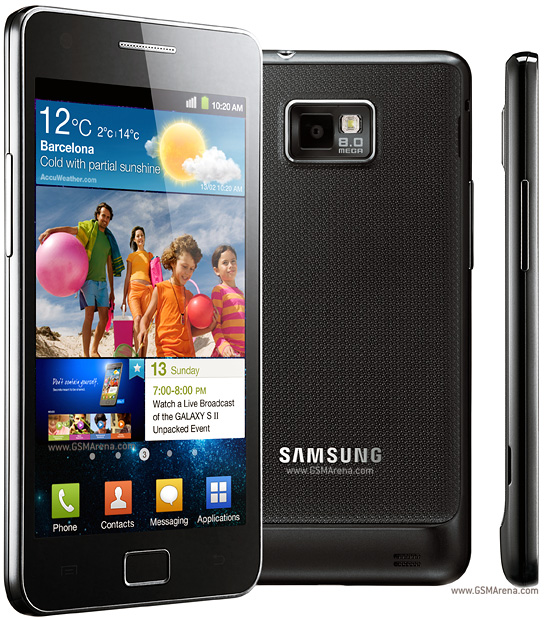
Samsung Galaxy S 2 new phone announced!

as you know Samsung galaxy is the most famous samsung mobile phone series and it's a one of the most famous Android phone. samsung keeps continuing this series. they recently announced about the newest member of Galaxy. it's Samsung Galaxy S 2 which is an extended version of galaxy S.
the new Galaxy S 2 has a 4.3 inch large super AMOLED display. the outer shape is almost similar to the Galaxy S but this time it comes with a Gyro sensor. also the Galaxy S 2 will have the TouchWiz 4.0 UI. the internal memory of this phone is 16 or 32GB and it supports up to 32GB memory cards. it has a 8MP camera with a LED flash. the camera supports 1080p video recording. also Galaxy S 2 comes with Android 2.3 OS. it powered by a Dual-core 1GHz ARM Cortex-A9 proccessor and has a Mali-400MP GPU.
Samsung galaxy S 2 integrated with google's NFC feature. it also has a FM radio, GPS and a digital compass.

Read rest of entry

3/03/2011

Spring Time Countdown Gadget

Countdown to Spring !


Add to Website - Add to Google - View XML


More info:

Don't worry, winter's almost over! Spring, also known as the vernal equinox, officially starts on March 22, 2011 at 7:21 pm EDT for those of us in the Northern Hemisphere.


Read rest of entry

Tweet your Hotpot ratings in Google Maps for Android

(Cross-posted on the Hotpot Blog and the LatLong Blog.)


Whether it’s Google Places with Hotpot or Google Latitude, we’re working on helping you connect the people you care about with places you love. Now, when you’re rating your dinner spot using Google Maps for Android, you can share your review with even more people by posting it to Twitter.


Post your ratings and reviews to Twitter
When you rate and review places like restaurants or cafes from Google Places, you can share valuable recommendations with your Hotpot friends and across Google’s products – in search results, on google.com/hotpot, and on Place pages. But we wanted you to be able to share your recommendations even more broadly. So today, you can start sharing your ratings and reviews with your followers on Twitter directly from your Android-powered device.


When rating on the go using our rating widget, just choose to Post review to Twitter and connect your Twitter account. You’ll get a preview of your tweet and will be able to post your ratings and reviews moving forward.


Post your ratings and reviews to your Twitter followers.


Check-ins: ping friends and search for places

Starting last month, you could share information about the place you were at, in addition to your location, by checking in at places using Google Latitude. Starting today, if you see nearby Latitude friends on the map and want to ask them where they are, you can quickly “ping” them instead of having to text or call. They’ll receive an Android notification from you asking them to check in at a place. And when they check in using your request, you’ll get a notification right back so you know which place to go to meet up with them.


From a friend’s Latitude profile, ping them (left) and they’ll receive a notification (right).


You’ll also be able to more easily check yourself in at the right place. Sometimes there are a lot of nearby places around you, and the right one is missing from the suggested list of places to check in. You can now quickly search for the right place using the Search more places button.


Search for the right place to check in if it’s not among the suggested places.


To start posting Hotpot ratings to Twitter and pinging Latitude friends, just download Google Maps 5.2 from Android Market here (on Android OS 1.6+ devices) everywhere it’s already available. Please keep in mind that both Latitude friends need version 5.2 in order to use the new “ping” feature. Learn more in the Help Center.

Read rest of entry

FaceFace Gadget

A facebook profile picture rating widget that randomly displays profile pictures and you can pick one.

Add to Website - Add to Google - View XML


More info:
A facebook profile picture rating widget that randomly displays profile pictures two at a time and you can pick which one is better. The votes are stored in a central database and you can see where you and your friends pictures rank. There is a search function built into the widget. You must allow Facebook access to register your and your friends profile picture.

Read rest of entry

Sony Ericsson XPERIA PLAY brings you a PSP experience

even now there are lots of PSP fans around the world. most of the people like it because it's portable. but what happen if a PSP integrated to your mobile phone?. now it's becoming a real thing because of the Sony Ericsson XPERIA PLAY mobile phone. it almost looks like a PSP and specially designed for gamers. but the difference is it runs with Android 2.3 OS. XPERIA PLAY has a 4 inch large LCD touchscreen and it's back light is LED.
to give you a better stereo sound, Sony Ericsson XPERIA PLAY has a dual speakers. and it has touch sensitive gaming controls. another thing is this phone comes with the latest version of Timespace UI.
since XPERIA PLAY is a gaming device, it has very powerful hardware. the processor is 1GHz and it has a Adreno 205 GPU to generate high quality graphics. this phone has a 5Mp camera and it supports 720p video recording. also there is a secondary camera which allows you to get video calls over 3G. like many Android 2.3 phones, XPERIA PLAY integrated with google's SNS technology. and it comes with all new google applications.

Read rest of entry

goo.gl URL Shortener Gadget

Fastest URL shortening on the Net. Shorten long URLs from your dashboard, homepage, blog or web site.

Add to Website - Add to Google - View XML


Read rest of entry

3/02/2011

Mobile editing in Google Docs now in 45 languages

Last November, we launched the ability to edit mobile docs in English. Today we’re excited to announce that you can now edit your docs on the go in 44 more languages.


To begin editing, visit docs.google.com in your mobile browser, and select a document to edit. Switch from view to edit mode by pressing ‘Edit’ to turn on the mobile editor and start typing away. As a reminder, mobile editing is available on Android (2.2+) and iOS (version 3.0+) devices. You can learn more about Google Docs for mobile on www.google.com/mobile. As always, feedback in the comments and on the forums is appreciated.


Read rest of entry

Honeycomb Buzzes On In

Yesterday morning, a tasty treat arrived on our campus. And what better way to welcome Honeycomb to the Android family than with redecorating the lawn of Building 44 a bit?


Posted by Andy Rubin, VP of Android Engineering
Read rest of entry
 

Gadget Guide Copyright © 2009 Gadget Blog is Designed by Ipietoon Sponsored by Online Business Journal