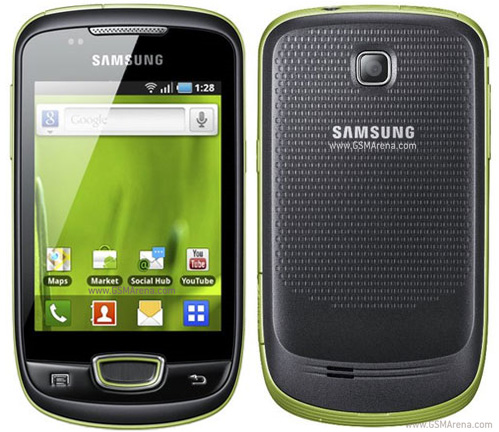
When a phone model becomes very popular, many mobile companies launches a mini version of the same phone to open it's market more wisely. the mini version has reduced features and less price, but easy to market. Nokia and Sony ericsson did this to their N97 and XPERIA phones. right now, Samsung Galaxy is the most famous mobile phone series. they recently announced a mini version of Galaxy. it's cheap and has a 3.14 inch capacitive touchscreen. but Galaxy Mini S5570 runs with Android 2.2 froyo version and it has a 600MHz processor. this phone comes with Samsung's TouchWiz v3.0 UI. Samsung has their own sound technology called DNSe and they included it to Galaxy Mini S5570. it has a 7.2MPp/s HSDPA modem, bluetooth and wi-fi. the internal memory of this phone is 160MB but it supports up to 32GB memory cards. Galaxy Mini S5570 has a GPS receiver, a Digital compass and a FM radio. the main camera of this phone is 3.15MP and it supports geo-tagging. also like all other Galaxy phones,Galaxy Mini S5570 comes with all Google applications.
We see a lot of you have shown interest in the colorful LG Optimus Me P350 phones! Take a look as these two friends have so much fun with LG Optimus Me P350, they don't even realize the sun becoming the moon! From excellent browser performance and seamless connectivity with Android™ 2,2 (Froyo). intuitive pinch zoom, easy web browsing with Voice Search™ to the five vibrant colors to choose from and affordability -- no wonder their exploration went for hours!
Introducing MOTOROLA ATRIX. Is this your next smartphone? Laptop? Desktop? Entertainment Centre? Or all the above? The world's most powerful smartphone is the future of mobile computing.
In this video we discuss how Android 3.0 Honeycomb might work on a smartphone. We know for a fact that Google plans to release Android Honeycomb for smartphones in 2011. It will allow for buttonless hardware, better multiasking, better management of the homescreens, and much more. Honeycomb will first show up on the Motorola Xoom tablet.
Ultimate Portable Entertainment System Makes Its Debut This Year, Further Expanding the PlayStation® Business in the Portable Gaming Market
Tokyo – Sony Computer Entertainment Inc. (SCE) announced its next generation portable entertainment system (codename: NGP), which delivers the ultimate portable entertainment experience. NGP will make its debut at the end of the year 2011.
NGP is designed to offer unparalleled interactive entertainment that is only possible on PlayStation®. This new system offers a revolutionary combination of rich gaming and social connectivity within a real world context, made possible by leveraging SCE's experience from both PSP® (PlayStation®Portable) and PlayStation®3 (PS3®) entertainment systems.
Deep and immersive gaming is at the core of PlayStation's DNA, and NGP is the latest embodiment of this vision. By having both Wi-Fi and 3G network connectivity, together with various applications, NGP will enable infinite possibilities for users to "encounter," "connect," "discover," "share" and "play" with friends wherever they are. Within the device are a range of features that provide a genuinely cutting-edge, next generation ultimate portable entertainment experience. ・Stunning OLED and Revolutionary User Interface
NGP incorporates a beautiful multi-touch 5-inch organic light emitting display (OLED) as the front display. A high-performance CPU / GPU combined with OLED enables rich, visually striking graphics never seen before on a portable entertainment system, for both games and other digital entertainment content. The new system also incorporates a unique multi-touch pad on the rear, and together with the front touch display, NGP offers new game play allowing users to interact directly with games in three dimension-like motion, through "touch, grab, trace, push and pull" moves of the fingers. ・Super Oval Design and Dual Analog Sticks
While succeeding the basic design philosophy of PSP, NGP adopts the Super Oval Design form factor, created to fit comfortably in users' hands. For the first time, a portable entertainment system will feature two analog sticks, which enable a wider range of game genres to be brought into the portable experience. ・LiveArea™
Every game title for NGP will be provided with a space called "LiveArea™" where users can share the fun and excitement with other players. Users will have access to the latest information of games provided from SCE and 3rd party developers and publishers through PlayStation®Network. Additionally, NGP users will be able to view an "Activity" log that is constantly updated with accomplishments from users who are playing the same game, which in turn can trigger active real-time communication among users. ・Near
SCE will also provide location-based services on NGP as part of the basic features utilizing PlayStation Network. The new application called "Near," developed specifically for this service and the network, will be pre-installed in the system to let users find out what their friends in the vicinity are playing now or what they were playing recently. Users can meet their friends and new players virtually, regardless of what games they are playing, simply by sharing their game information across different dimensions of time and distance. ・New Game Medium
NGP adopts a new game medium, a small flash memory based card, dedicated for NGP software titles. Taking advantage of the flash memory feature, this innovative card can store the full software titles plus add-on game content or the game save data directly on to the card. By adopting flash memory based card, SCE will be able to provide game cards with higher capacity in the future, allowing developers to store more game data to deliver rich and immersive games.
NGP will also come equipped with two cameras on its front and rear, as well as three motion sensors, gyroscope, accelerometer and electronic compass, all of which are designed to enable users to enjoy the world of entertainment that is linked with real life experiences.
PlayStation®Suite (PS Suite), announced today, will also closely coordinate with NGP. The newly developed and released game content for Android™ based portable devices can also be enjoyed on NGP. As a result, users will have access to not only the most leading-edge content, but also some of the more casual experiences that typify the mobile market place.
SCE will vigorously promote NGP towards the launch as the next generation portable entertainment platform and deploy various measures to further expand the portable gaming market.
Simultaneously Launching "PlayStation®Certified" License Program to Provide PlayStation® Content and Development Support for Android™ Based Portable Devices.
Tokyo - Sony Computer Entertainment Inc. (SCE) unveiled "PlayStation®Suite" (PS Suite), delivering the PlayStation® experience to Android™ based portable devices*1. Through this entirely new initiative, users will be able to enjoy PlayStation content on an open operating system for the first time in PlayStation history.
In the dramatically evolving and diversifying mobile market, the number of users who enjoy games casually on a variety of devices including mobile phones, smart-phones and tablet PCs, has been increasing significantly. By offering "PlayStation quality" content to this rapidly growing market, SCE will not only deliver the PlayStation experience to a wider base of users around the globe, but will also be able to offer game developers and publishers the potential to further expand their business opportunities to these devices.
In providing the PlayStation experience on Android based portable devices, SCE will commence a "PlayStation®Certified" license program for hardware manufacturers. Through this program, SCE will offer necessary support, including development support as well as logo licensing, to ensure the delivery of PlayStation quality experience across various devices.
On the software front, SCE plans to provide PS Suite content within this calendar year, starting with original PlayStation games*2 (PS one® classics) that will allow users to enjoy "PlayStation quality" gameplay on their Android based portable devices. SCE also plans to open PlayStation®Store where users will be able to download content in an easy to use environment, directly via the Android based portable devices. Moreover, SCE will provide a new game development environment in an effort to ensure new and compelling content is delivered on PS Suite, which will also offer opportunities for a wider base of developers and publishers to further expand their business on various portable devices.
Newly developed content for PS Suite can also be enjoyed on the next generation portable entertainment system (codename: NGP), which SCE announced today. Users who have never experienced PlayStation content can get a taste of the PlayStation experience through PS Suite and from there, they can enjoy the ultimate portable entertainment experience that is only possible on NGP.
SCE will vigorously enhance the entertainment world delivering the PlayStation experience to a wider base of users.
*1 Android™ 2.3 or beyond is required.
*2 PS one game console software title. We will announce the tiles when ready.
GLOBAL – Being disorganised is SO last year. This year is about getting things in order and being as efficient as possible. For us anyway. That’s why we’ve put together a little guide to how you can make this year a productive one, right from your own mobile phone. Find out how you can get organised with your Nokia, right here. Read on.
We’re hoping last year was a great year for you and we’re here to help you make this year an even better one. With some useful advice and tips on how to make the most of your phones native software, plus some help from the apps that await your attention from Ovi Store.
1. Ovi Setting up an Ovi account is the best way to get the most of your Nokia phone. Once you’re set up with your free account at Ovi.com, you’re phone is only a few clicks away from any service Nokia have to offer.
2. Email Pre-installed on all Nokia devices, it goes under the name of Nokia Messaging and it’s the first thing we do when setting up a new phone. With support for Ovi Mail, Yahoo! Mail, Google Mail, Windows Live Hotmail and many other POP/IMAP accounts, as well as corporate accounts using Microsoft Exchange, you’ve got access to ten personal email accounts. Instantly connecting your phone to any/all of your inboxes.
3. Ovi Store For those apps that aren’t already installed on your phone, it’s the best and quickest way to get apps. Shopping at Ovi Store is as simple as clicking the icon and browsing through through thousands of apps and games.
4. Sticky Notes Touch No organised person would be complete without Stickynotes. You write little things down and stick them on your wall to remind you to-do something later. Sticky Notes Touch lets you jot down tasks quickly, onto a virtual cork noticeboard.
5. Ovi Maps Ditch the A-Z or the other route planners you browse on the net before you leave the house. Switch on Ovi Maps on your phone and you’ve got instant navigation – with turn-by-turn directions – to anywhere in the world. For free, forever.
6. Multiple alarms If you wake up at 5am every morning, bringing yourself to reset that alarm every night is the last thing you want to do. Set up a repeating alarm so that you only need to set it once, leaving the phone to do the boring repetitive bit by itself. Navigate to the Alarm section of your phone, add your new alarm time and choose which days you want the alarm to sound. Job done.
7. Ovi Contacts Personal data is the number one thing people care about most when something goes wrong with their technology. A phone can be replaced, but the phone numbers held within can be lost forever. Ovi Contacts can grab all the phone contacts from your phone and store them online, forever. Syncing your phone over-the-air with the server from time to time will keep this list up-to-date and keep your contacts safe and sound.
8. Social Being organised doesn’t just mean being on top of things at work, your social life also needs organising too. You don’t want to forget someones birthday do you? Social keeps you up-to-date with your friends’ activity – through their status updates or tweets – and lets you download events they’ve organised on Facebook right into your phone calendar and comes built-in with new Symbian devices.
9. Quickoffice Pro 6 Do some of your work on the hour-long train journey home, so you can spend some more time playing with the kids or shooting zombies in that new game you’ve got. Whatever you prefer. Quickoffice Pro 6 turns your phone into a portable work desk, enabling you to go through those accounts and finish that presentation for the next morning.
10. Memory Status Touch After a while and a good few months down-the-line, you might notice you’ve filled all that storage space on your phone with apps, games, music, videos and photos. Memory Status Touch, helps you keep an eye on the memory of your phone so you know when it’s time to do some house-keeping, to remove some of that old content.
MUMBAI, India – Nokia has been voted the most trusted brand in India according to a survey conducted and published by research firm Trust Research Advisory (TRA). The “Brand Trust Report, India Study 2011″ was launched in Mumbai on Tuesday by Dr A P J Abdul Kalam, Former President of India. The survey covered 16,000 brands, based on 61 questions to 2310 respondents in nine major cities.
The number two and three spots were taken by Tata and Sony, respectively, while LG and Samsung were positioned at number four and five.
Describing the methodology of the survey, TRA’s CEO N Chandramouli said, “As trust is a veiy subjective term, we developed a trust matrix which included 61 components defining trust which include empathy, non-threatening ambience, perceived competence, corporate altruism, commanding respect, shared interest, displaying sincerity, enthusiasm, outward appearance and accepting responsibility.”
Other interesting results from the survey were that Pepsi came in at number 36, while Coca-Cola was at 60th place.
The survey also ranked personalities, with cricketer Sachin Tendulkar coming in at 59, ahead of Father of the Nation, Mahatma Gandhi, (ranked 232nd) and Bollywood actor Aamir Khan (242nd).
GLOBAL – It’s that time of the year again when we at Nokia Conversations want to remind you all that the so-called Nokia Lottery is a dishonest scam. We’ve warned against this for the past two years but still we hear news – through our comments – that the scammers are still trying get you to part with your hard-earned cash. Don’t let them get it. It’s yours; keep it. Join us as we give you some tips on how to stay safe this year.
Back in 2009 we let you know that the Nokia Lottery doesn’t exist and never will. Then in early 2010 we did the same thing again, as it’s clearly needed. Racking up more than 700 comments combined, you’ve copied and pasted the scamming emails you’ve received in your droves. This is a great way of helping fellow readers determine what’s real and what’s not. But it always ends the same way: the Nokia Lottery isn’t real. How the Nokia Lottery scam works
There are a couple of methods these scammers use, in the hope of stealing your money.
You receive an email claiming you have been chosen at random, to receive a prize, usually a large figure of money. In this case, £350,000 is the prize. However, to receive your winnings you must send them some money as an admin charge. £650 in this same case. They hope you’ll be so dazzled by the large sum of money they claim you’ve won, that you’ll send the admin fee. It’s at this point you’ll never hear from them again and your money will be lost.
A second method commonly used is contacting you by SMS. These text messages will tell you you’ve won a heap of money, like in this case, but you must first phone a telephone number or email back to hand over your bank details. Do not do this. Never give your bank details to a stranger, especially if all you know about them is their mobile phone number.
Whatever method they use, they will be asking for the same thing. Either your bank account details, or some money in another form and the messages they send always look official, but they’re not. They’re fake. What to do if you receive a Nokia Lottery scam SMS or email
Don’t respond to the messages, doing so will only encourage them to keep contacting you.
There are several agencies and sites out there to help you, where you can report the fraud in the hope to get these stopped:
Action Fraud Snopes The Anti-Phishing Working Group
If you haven’t entered any competition, or if the prize looks too good to be true, then it almost certainly will be. Let’s have a safe 2011.
GLOBAL – Email delivery to your mobile phone is becoming very popular. Emailing from your phone has plenty of benefits, but what do you do with those emails that are 20MB in size, with some high-res images or 30 page PDFs? Mobile Documents by VISIARC, offers email retrieval, via The Cloud. Read on to find out more.
Emailing on-the-move, via a phone, is a great way of keeping in contact with anybody in the world. Especially if you’re waiting for that important email from work telling you you’ve won that new contract, or something. However – up until now – opening large emails on your Nokia phone has not only been time-consuming, but also costly. Downloading a file of 65 MB, just to find out that the information inside isn’t really relevant, can end up costing you lots of money. So you could log onto a PC and download the files that way, but that’s not always possible when you’re on a train, plain or anywhere else. Mobile Documents opens up your email as a normal email client would, but within the email it’ll show you the attachments all laid out with details of how large the file is, how many pages, the type of document and a thumbnail of the document itself. Setting up Mobile Documents
First on the agenda is to download the app. This app’s currently in Beta phase, which means it’s still in development but is nearly ready. Beta apps give you the opportunity to play with an app before it goes live, so some changes will be made when it finally graduates. Download from Nokia Beta Labs, or the Ovi Store. We noticed that you have to install the app to the C drive, as installing to E meant the homescreen widget didn’t find Mobile Documents. Install complete, you’ve got the freedom to browse the demo on your phone. We’d recommend you try the demo first as it’s a good way of knowing what the app is all about without setting up your email addresses, that comes later.
Happy with your tutorial and want to continue setting up your email accounts? Go back to the main screen and enter your email address to sign up for the full version, which is still free. During setup, you’ll need to assign your email account with a pin number, for added security, which we think is a good idea. Homescreen widget setup
Find an empty slot on one of your homescreens and long-press on the screen. Select the plus symbol, scroll to mail and your mailbox will ask you to select which email account you wish to use. Now you’ll notice you have the Mobile Documents logo next to your email address, selecting this will mean all your mail will now run through the Mobile Documents client. Viewing attachments
If you receive a large email with attachments, open it up and scroll to the bottom to find the attachments. Pressing on one of these attachments will bring up a menu with the options; View, Read, Copy and Download.
View, opens a preview of the document with the ability to flick through the pages from left to right. This is great for selecting what you actually want to view from the document without having to download it first.
Read, transcribes the document for you and gives it to you in the simplest form. If you’ve got a PDF or Word document, Read will give you the text version.
Copy, allows you to copy that file to your clipboard and Download, does what you’d expect. It saves it to to your phone for later use, if you so need it.
One of the great features of Mobile Documents is that you can send any of the attachments you’ve already received, onto somebody else without having to download the file. Because all this data is never actually downloaded in the first place, you’re simply passing the information from the server to the other recipient, this is called Cherry Picking. Cherry Picking
Open Mobile Documents, select the email account you wish to send an email from if you have more than one, and compose new mail. Start with adding the contact who will receive the email. Next, press the screen below the subject line. This is the box you’ll need to type your message in. Once you’ve typed your message, press Add Att. at the bottom of the screen and it’s here that you can browse any other email – from any email account you’ve set up- and add an attachment straight into your message – without ever downloading it onto your device. Pressing send will send the email instantly, from The Cloud. Document Support
You’ll be able to retrieve most documents that get sent to your inbox, as there is currently support for a variety of Word documents and image files; .jpg .png .pdf .doc .ppt
Currently Mobile Document is available for the Nokia N8. Download it from Ovi Store, or Nokia Beta Labs However, remember as it’s a Beta app, it may be a little rusty around the edges.
GLOBAL – With the Christmas festivities over, it’s time to put away the sherry and throw out those mince pies and start working at reducing that extra weight we’ve put on over the past few weeks. Saying and doing are two different things, though. We’re here to support you through this tough time, with some handy apps that will make the process a little easier to achieve. We’ve got five apps that you’ll want to load up to keep you on track, from Ovi Store. 2011 Resolution Reminder
Making a list of what you want to achieve in your fitness-filled year is the key to success. Without actually really writing it down, it’s all too easy to forget and pretend the six-pack you desire can wait until next year. It’ll never happen. 2011 Resolution Reminder has a really simple interface, pressing + Add resolution does exactly what you would expect. Once you’ve added a couple of things you want to take care of this year, you can now add reminders to them to help you not forget. Pressing the clock item next to one of the listed items lets you set a time and a day to remind you. You can choose every day, just one day a week or just on the weekends, so you’ve got the flexibility to choose when it’s convenient to do that task. Find yourself one week in and feeling proud that you’re sticking to the resolutions? Hit the Share on Facebook button to tell all your friends about it.
Speedhero Football Lite
Kicking a ball with your friends in a park on a Sunday morning is a fun way to burn off some of those unwanted calories. So is just kicking a football as hard as you can. Install Speedhero Football Lite, place your phone on the ground a few feet away from the ball and give yourself a long run up to the ball. Run to the ball and give it the biggest kick you’ve got and this app will give you the top speed of your shot*. Using sound recognition technology, this app listens to the speed of the ball, or more accurately, the sound of the thump as your foot hits it. Clever stuff. This free version offers you ten hits and if you want to continue using it you’ll need to purchase the full version; Speedhero Magical Games, for £8.00.
*Please don’t try this indoors, outdoor use is essential. Wellness Diary
Having a diary to keep track of your eating habits and exercise routines is a must if you’re to ever truly beat the bulge. Wellness Diary keeps a record of your height, weight, BMI and the types of food you eat in any given day. Most of it you have to manually update, as there’s no way an app can know what you’ve eaten otherwise. The steps counter is something I found useful, as I’ve no idea how many steps I take in a day, apparently the average should be 10,000. Knowing I now take about half of that, generously, leaves me with the desire to walk more. And with it being the easiest type of exercise, we’re sure you would like to start your training-regime with something as simple as walking.
The Vitamin Widget
If you’re trying to cut back on the sweets and want to start eating more fruits or vegetables, you’d probably like to know what are the benefits. This app is a database of most of the common fruit and veg you’re going to see in the supermarket and gives you details on what vitamins they contain. Really quite useful if your trying to control the intake of certain vitamins such as vitamin C, it is flu season after all. The smoothie section of the app is a good little add-on, as it tells you how mix your favourite fruits into near-liquid form for easy consumption. You can even share and upload you own recipes, but you’ll need to create an account for that, which is free. Sports Tracker
If taking to the streets with running, cycling or roller skating is your thing, Sports Tracker is a great way of logging your workout. Create your profile, select the New workout option and you’ll be taken to the workout page. It’s here you’ll see the clever bits, like distance you’ve travelled, your pace and even a map of your route using the built in GPS on your phone. If you’re fortunate enough to own the Sports Tracker heart rate transmitter, you’ll even be able to keep an eye on your heart rate on the phone while your doing your exercise. Workout complete, you can upload all the training session’s details to the Sports-Tracker.com server or even your friends on Facebook.
A crocodile at a Ukraine zoo snaps up a mobile phone after a visitor drops it while trying to get a picture. Now, doctors say the croc is not eating and seems sluggish. If it does not get better, they may have to operate. (Jan. 21)
Dividend of EUR 0.40 per share will be proposed for 2010 (EUR 0.40 for 2009)
Nokia Corporation Stock Exchange Release January 27, 2011 at 13.15 (CET +1)
Espoo, Finland - Nokia announced today that its Board of Directors has resolved to convene the Annual General Meeting on May 3, 2011 and that the Board and its Committees will submit the below proposals to the Annual General Meeting.
- Proposal to pay a dividend of EUR 0.40 per share - Proposals on the Board composition and remuneration - Proposal for a new stock option plan as part of Nokia Equity Program 2011 - Proposal to authorize the Board to repurchase shares to maintain flexibility but with no current plans to repurchase shares in 2011 - Proposal to re-elect the external auditor
Proposal to pay a dividend The Board will propose to the Annual General Meeting that a dividend of EUR 0.40 per share be paid for the fiscal year 2010. The dividend ex-date would be May 4, 2011, the record date May 6, 2011 and the payment date on or about May 20, 2011.
Proposals on Board composition and remuneration Nokia Board members, Lalita Gupte and Keijo Suila, have informed that they will no longer be available for the Nokia Board of Directors. Ms Gupte was first appointed to Nokia Board in 2007 and she has been a member of the Audit Committee during her entire directorship. Mr Suila has been Nokia Board member since 2006 and he is currently also a member of the Personnel Committee.
The Board's Corporate Governance and Nomination Committee will propose to the Annual General Meeting that the number of Board members be eleven (11) and that the following current Nokia Board members be re-elected as members of the Nokia Board of Directors for a term ending at the Annual General Meeting in 2012: Bengt Holmström, Henning Kagermann, Per Karlsson, Isabel Marey-Semper, Jorma Ollila, Marjorie Scardino and Risto Siilasmaa.
In addition, the Committee will propose that Jouko Karvinen, CEO of Stora Enso Oyj, Helge Lund, President and CEO of Statoil Group, and Kari Stadigh, Group CEO and President of Sampo plc, be elected as members of the Nokia Board of Directors for a term ending at the Annual General Meeting in 2012. Also, the Committee will propose election of Stephen Elop, President and CEO of Nokia Corporation, to Nokia Board of Directors for the same term.
Additional information about the Board member candidates will be available in the Committee proposal.
As to the Board remuneration, the Corporate Governance and Nomination Committee will propose that the annual fee payable to the Board members elected at the Annual General Meeting on May 3, 2011 for a term ending at the Annual General Meeting in 2012, remain at the same level than during the past three years as follows: EUR 440 000 for the Chairman, EUR 150 000 for the Vice Chairman, and EUR 130 000 for each member, excluding the President and CEO of Nokia if elected to the Nokia Board; for the Chairman of the Audit Committee and the Chairman of the Personnel Committee an additional annual fee of EUR 25 000; and for each member of the Audit Committee an additional annual fee of EUR 10 000. Further, the Corporate Governance and Nomination Committee will propose that, as in the past, approximately 40% of the remuneration be paid in Nokia Corporation shares purchased from the market, which shares shall be retained until the end of the board membership in line with the Nokia policy (except for those shares needed to offset any costs relating to the acquisition of the shares, including taxes).
New stock option plan as part of Nokia Equity Program 2011 As part of Nokia Equity Program 2011, the Board proposes to the Annual General Meeting that selected personnel of Nokia Group be granted a maximum of 35 million stock options until the end of 2013. The planned maximum annual grant for the year 2011 under this Stock Option Plan 2011 is approximately 12 million stock options, with the remaining stock options available through the end of 2013. The proposed 2011 Stock Option Plan will succeed the previous 2007 Stock Option Plan approved by the Annual General Meeting 2007 which has not been available for further grants of stock since the end of 2010. The stock options entitle recipients to subscribe for a maximum of 35 million Nokia shares over the life of the plan. The sub-categories of stock options to be granted under the plan will have a term of approximately six years. The vesting periods of the stock options are as follows: 50% of shares granted under each subcategory vesting after three years from grant date and remaining 50% vesting four years after the relevant grant date. The exercise period for the first sub-category will commence on July 1, 2014 and the exercise period for the last sub-categories will expire on December 27, 2019. The exercise prices (i.e., share subscription prices) shall be determined on a quarterly basis at grant and will be equal to the market price of the Nokia share quoted in public trading at the time of the pricing, as determined in the plan's terms and conditions.
The overall Nokia Equity Program 2011, following previous years' practice, has the below structure as approved by the Board of Directors and subject to the approval of the Stock Option Plan 2011 by the Annual General Meeting:
- Performance Shares - offered as the main equity-based incentive to approximately 4 700 employees, who receive shares only upon the achievement of threshold level for the two independent performance criteria: Average Annual Net Sales Growth and Average Annual EPS; - Stock options - a more limited plan, used in conjunction with performance shares on a selective basis for senior managers, to better align with a focus on Nokia share price appreciation; and - Restricted Shares - granted on a very selective basis to retain our high potential and critical talent, vital to the future success of Nokia.
As Nokia clarifies its strategic directions, the Equity Program 2011 will support employee focus and alignment with the company's targets. The Equity Program 2011, like Nokia equity programs of previous years, will attract, retain and motivate critical talent. Similarly, it intends to align the potential value participants receive directly with the long-term performance of the company, thus aligning the participants' interests with Nokia shareholders' interests. Nokia's balanced approach and use of the performance-based plan as the main long-term incentive vehicle effectively contributes to the long-term value creation and sustainability of the company and ensures that compensation is based on performance.
Under the Nokia Performance Share Plan 2011, Nokia shares will be delivered provided that the Company's performance reaches at least one of the required threshold levels measured by two independent performance criteria:
(1) Average annual net sales growth during the performance period; and
(2)Average annual earnings per share (EPS) (diluted, non-IFRS) during the performance period.
The threshold and maximum levels for the Performance Share Plan 2011 are scheduled to be determined and disclosed during the first quarter of 2011. No Performance Shares will be granted under the plan prior to that.
The Performance Share Plan 2011 has a three-year performance period (2011-2013). The grant of Performance Shares in 2011 may result in an aggregate maximum payout of 28 million Nokia shares, should the maximum level for both performance criteria be met. Nokia intends to continue to grant performance shares also in 2012-2013 up to a total maximum payout of approximately 56 million Nokia shares, should the maximum level for both performance criteria be met.
The Restricted Share Plan 2011 has a three-year restriction period. The grant of Restricted Shares in 2011 may result in an aggregate maximum payout of 9 million Nokia shares. Nokia intends to continue to grant restricted shares also in 2012-2013 up to total payout of approximately 18 million Nokia shares.
As of December 31, 2010, the total maximum dilution effect of Nokia's equity program currently outstanding, assuming that the performance shares are delivered at maximum level, is approximately 1.5 %. The potential maximum effect of the Nokia Equity Program 2011 will be approximately another 1.3 %.
The performance period for the Performance Share Plan 2008 ended on December 31, 2010, and there will be no settlement under the plan as the threshold performance criteria of EPS and Average Annual Net Sales Growth were not met. To fulfill the Company's obligations under other, considerably more limited equity incentive plans, Nokia's Board of Directors has resolved to issue a total amount of 1 315 000 Nokia shares (NOK1V) held by the Company to settle its commitment to approximately 500 participants, employees of the Nokia Group.
Proposals to authorize the Board to repurchase shares The Board will propose that the Annual General Meeting authorize the Board to resolve to repurchase a maximum of 360 million Nokia shares. The proposed maximum number of shares is the same as in the Board's current share repurchase authorization and it represents less than 10 % of all the shares of the Company. The shares may be repurchased in order to develop the capital structure of the Company, finance or carry out acquisitions or other arrangements, settle the Company's equity-based incentive plans, be transferred for other purposes, or be cancelled. The shares may be repurchased either through a tender offer made to all shareholders on equal terms, or through public trading from the stock market. The authorization would be effective until June 30, 2012 and terminate the current authorization granted by the Annual General Meeting on May 6, 2010.
The repurchase authorization is proposed to maintain flexibility, but the Board has no current plans for repurchases during 2011.
Election of external auditor In addition, the Board's Audit Committee will propose to the Annual General Meeting that PricewaterhouseCoopers Oy be re-elected as the Company's auditor, and that the auditor be reimbursed according to the invoice and in compliance with the purchase policy approved by the Audit Committee.
The notice to the Annual General Meeting and the complete proposals by the Board and its Committees to the Annual General Meeting are scheduled to be published on Nokia's website at www.nokia.com/agm on February 2, 2011.
Press kit available at http://www.nokia.com/A4686368?kit=135
Orange have launched a number of phones that go back to basics and improved the often maligned audio quality of today's communications. HD Voice aims to sort this out, offering better voice reproduction and ambient noise cancellation. Martin Stanford experiments.
867-5309 could be one of the most iconic phone numbers of all time, but it’s not the only number that a lot of us remember by heart. Many of us have a phone number that we've shared with family, friends, and contacts over the years and are reluctant to let go.
One of the most frequent requests we hear from people who use (or want to use) Google Voice is that they’d like to get all of Google Voice’s features without having to give up their long-time phone numbers.
Today, we’re excited to announce that Number Porting is available for all existing Google Voice users. This means you can make the mobile number you’ve always used your Google Voice number, so it can ring any phone you want—or even your computer.
To get started with Number Porting, log in to your Google Voice account, visit the Settings page and click on “Change / Port” next to your Google Voice number.
Porting your number to Google Voice costs $20 and is usually completed within 24 hours. You may incur additional charges, including early termination fees, from your wireless carrier. Contact your carrier to get more details about the charges applicable to you.
After porting your number to Google Voice your mobile service plan will be cancelled, and there are a couple of steps that you’ll have to take to continue making and receiving calls on your mobile device. For more detailed instructions on how Number Porting works and to find tips for making the process as smooth as possible, visit the Google Voice Help Center.
Number Porting is currently available for existing Google Voice users and will become available to new users within the next few weeks, and at this time, Google Voice is available in the U.S. only
Posted by Robert Dong, Software Engineer
Update (1:15PM): Included more details about the porting process.
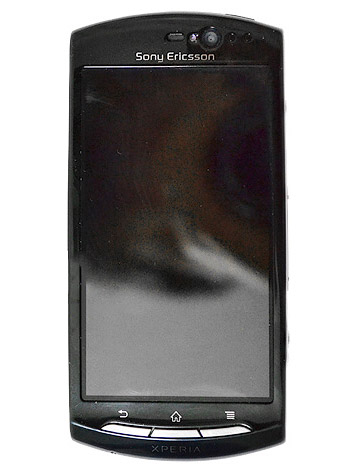
Sony Ericsson XPERIA is a very famous mobile phone series of Sony Ericsson. the first phone of this series was XPERIA X1. it had a QWERTY keypad and the OS was their own one. but Sony Ericsson XPERIA X10 did a revolution, it runs Android OS and it's a one of the best Android phone. according to the rumors they going to release the next phone of this series. that is Sony Ericsson XPERIA Halon. it's also an Android phone and it will comes with Android 2.3 gingerbird. most of the specifications are unofficial. it has a 4 inch LCD and the screen resolution is 480 x 854 pixels. according to the leaked specifications, XPERIA Halon might be a budget phone. the internal memory is 512MB and it supports up to 32GB memory cards. also XPERIA Halon runs with a Qualcomm MSM7630 1GHz processor and a 512MB RAM. the main camera of this phone is 8Mp and it supports HD video recording. also XPERIA Halon has video calling feature. another new feature of this phone is SNS integration. according to the resources, the Sony Ericsson XPERIA Halon will be announced in April 2011.
We’d been wanting to build a fun, useful, app-like way to display weather information on our search results pages in the mobile browser. So we pulled together a user experience designer and team of engineers and built a new weather search results snippet that lets you actually play with the results. To try it out, just go to google.com on your iPhone or Android-powered device and search for ‘weather’.
At first glance, you’ll see content that we’d previously shown you before: current conditions and a forecast for the next few days. But by moving the slider over the next 12 hours, you can now see a detailed hour-by-hour breakdown of the changing weather conditions. As you do this, keep an eye on the temperature, wind speed and humidity and see how all these conditions are expected to trend across the day. You may also notice that the background color changes throughout the day. Of course, as you scroll further down you’ll see our regular web search results for your query.
This new weather search experience is available only in English, but we have more updates on the way. We hope you’ll enjoy using it!
Posted by Nick Fey, User Experience Designer and Michael van Ouwerkerk, Software Engineer
Back in April 2010 we announced Google Cloud Print, a service that in Beta allows printing from any app on any device, OS or browser without the need to install any software. Just last month we opened Google Cloud Print to users in the Chrome notebook pilot program. Today we are very pleased to announce the beta launch of Google Cloud Print for mobile documents and Gmail for mobile, which we will be rolling out to users throughout the next few days.
Imagine printing an important document from your smartphone on the way to work and finding the printout waiting for you when you walk in the door. Just open a document in Google Docs or an email in Gmail in your mobile browser and choose “Print” from the dropdown menu in the top right corner. You can also print certain kinds of email attachments (such as .pdf or .doc) by clicking the “Print” link that appears next to them.
This feature will be rolling out today and tomorrow for English speaking users in the US and will work on most phones that support HTML5, such as devices running Android 2.1+ and iOS 3+. To get started, you’ll need to connect your printer to Google Cloud Print. This step requires a Windows PC for now, but Linux and Mac support are coming soon. You can learn more at the Google Cloud Print help center.
Samsung Galaxy S 4G is the latest member of Samsung Galaxy family. this is a 4G phone and it might be the Samsung's first 4G phone. due to some reason Samsung keeps continuing the same design for most of galaxy phones. there is no difference with Galaxy S and this phone in appearance. Samsung Galaxy S 4G has a 4 inch super AMOLED display and the resolution is 480 x 800 pixels. it comes with Gorilla Glass display which is scratch resistant. Galaxy S 4G has 1GB internal memory and supports up to 32GB memory cards. like Galaxy S, Galaxy S 4G has a 1GHz ARM Cortex A8 processor and 512MB RAM. also the camera is 5Mp and it supports 720p HD video recording. even if the Android 2.3 ginger bird is released, Galaxy S 4G comes with 2.2 froyo. Samsung Galaxy S 4G is available in 2 colors, black and gray. it has a GPS receiver and a digital compass. the maps application is google maps. also as a new features, Samsung Galaxy S 4G comes with Qik services for video calls. the battery capacity is 1650mAh so the talk and standby times will be high.
FlashTool now is something like an all in one Tool for your phone.
It can: - Flash original Images (Android 1.6 & Android 2.1 Images) - Root your phone - Install xRecovery, Busybox - Clean your Rom (remove /system/apps apps of your choice) - Clear dalvik cache - Optimize (install of JIT v2) - Customize (installs apps found in the custom/apps folder of the flashtool) - Clean uninstalled (remove any references to system apps removed in the Clean (root needed) step)
DISCLAIMER ABOUT THE 0.2.4 VERSION
This new version works with ftf files stored in the FlashTool\firmwares\ folder. To build these ftf files, you have to go to Advanced -> Bundle Creation.
- Source folder : folder where your sin files are. - Device, Version, Branding are informations about the firmware you want to create. These fields are mandatory. The name of the ftf file will be based on these 3 informations - take sin from the folder list to the firmware list and then click OK.
The ftf file will be created directly in the firmwares folder. Et Voila!
NTT DoCoMo, Inc. in the sale, DoCoMo smartphone Xperia ™ (* 1) (SO-01B) of "upgrading" functional sequence will start from January 19, 2011. By this version, Xperia ™ touch pinch zoom (enlarge by expanding two fingers on the screen by closing smaller operations) are available.
The implementation of the upgrade, PC There are two methods of connection and packet communications, packet communications charges, because it takes, we recommend connection to a PC. The version of the packet, was conducted in November 2010 Android (* 2) 2.1 version for OS was carried out is only possible with Xperia ™.
PC Connection: January 19, 2011 (Wednesday) ready soon begin offering higher Packet communication method: January 20, 2011 (Thursday) scheduled to begin later in sequence Details of the upgrading method, NTT DoCoMo, please check the website. http://www.nttdocomo.co.jp/support/utilization/software_update/
Pinch to zoom, enlarge by expanding two fingers on the screen refers to the operation by closing shrink.
The features of this version, the application corresponding to the operation of the pinch zoom browser, maps, Office Suite, Moxier is Puriinapuri mail.
* Downloaded some applications, may not work. * Due to the device, at least three (multi) sense is not supported. * Multi-touch operation of the rotation is not supported. This version features the implementation, in addition to the above, Xperia ™ [included] in order to improve the quality of stay in more comfortable. Implementation of the feature version thank you.
For more details on upgrading, please check the website of Sony Ericsson. http://www.sonyericsson.co.jp/product/docomo/so-01b/update/index.html
Nokia Board of Directors will propose a dividend of EUR 0.40 per share for 2010 (EUR 0.40 per share for 2009).
Nokia Corporation Interim Report January 27, 2011 at 13.00 (CET +1)
This is a summary of the fourth quarter and annual results 2010 interim report published today. The complete fourth quarter and annual results 2010 interim report, including the full year 2010 information and tables, is available at http://www.nokia.com/results/Nokia_results2010Q4e.pdf. Investors should not rely on summaries of our interim reports only, but should review the complete interim reports with tables.
Extract the Dualtouch.rar from here: http://www.multiupload.com/K97IO1FTAR Mirror: http://dl.dropbox.com/u/17170888/Dualtouch.rar
and copy the "Dualtouch" Folder inside the Firmwares Folder of Flashtool. After that just flash and reboot =) If the Rom is capable of Dual-/Multitouch you will have it now.
Regards Bin4ry
NOTE: This will just ADD dualtouch feature to your ROM. It will not wipe userdata or something else, see it as an addon =)
EXCLUSIVE: Windows Phone 7 still a possibility but not a focus
Sony Ericsson has confirmed that it will continue to put its weight behind Google’s Android operating system, although it says that it's still keeping the door open to Microsoft and its Windows Phone 7 mobile phone system.
“We are keeping a watching brief”, Steven Walker, acting head of global marketing at Sony Ericsson told Pocket-lint in a one-to-one interview at CES in Las Vegas.
“We've done a lot of work with Microsoft over the years. We’ve launched a number of 6.xx products, but we made a decision not to bring a product to market in the first wave. We absolutely maintain to keep an open mind towards Windows Phone 7. We continue to engage in a relationship with Microsoft, but we haven’t made any concrete announcement about when and how we would introduce Windows Phone 7 into the portfolio”.
Walker says that Sony Ericsson is instead focusing on Android, galvanising behind the OS to create a strong ecosystem for consumers:
“We do think it’s important at this moment in time to focus our external messaging on Android based products. We see the need as an industry to galvanise behind the Android ecosystem to create a strong ecosystem for consumers”.
Why? Walker says the answer is simple:
“We need to do this so that there will only be a certain number of eco-systems that will prevail. Developers won’t develop for 17 eco-systems. Consumers won’t choose between 100 different eco-systems. In the end only a certain number will prevail”.
But it’s not going to be Android and only Android; like Motorola, Walker does acknowledge that the company will have to embrace other operating systems in the future:
“We shouldn’t limit ourselves to one opportunity, but we aren’t yet ready to make any specific announcement about products. At this moment in time, there is clearly a galvanising within the industry around Android as a creditable alternative to what’s out there, and we think that’s a good thing”.
When asked as to whether he was worried about a possible fragmentation of the Android OS occurring, Walker was confident that Google will sort out the main issue currently on the minds of most high-end Android users: which version are they running?
“Of course some people care. In the higher end of the market the spec savvy consumers do. If you take the broad church of Android users there will be a big chunk of people that don’t care, there will be people that upgrade and don’t notice. I do think that the release thing is an issue of this particular moment. I think once Android becomes a much more accepted part of the market overall I think the release itself will become a less critical part of the whole solution. Right now there is a lot of focus on what release of Android it is on. It’s the first question people ask “which version of Android is it on”, but in a year’s time I don’t think it will be the first question people ask, it will be in the list of questions but it won’t be the first question”.
So does that mean only new phones with the latest versions of the OS? It looks likely:
“That said we are launching a product in Q1 of this year running 2.3, we have recognised the need to have our products on the latest release. Last year we didn’t anticipate the strength of feeling that consumers would have towards the Android release. And again that was a learning experience of the first year of mass market Android smartphones”.
Samsung Galaxy S was a madness around the world, because of it's awesome features and Android OS. Samsung seems to be continue this Galaxy trend by launching various phones to the series. according to the rumors, the newest galaxy phone is Galaxy Ace S5830. it hasn't been officially announced yet but lots of specifications has leaked. according to the specifications of the phone, this seems to be a cheap version of Galaxy. unlike galaxy S, Galaxy Ace S5830 has 4 inch a TFT capacitive touchscreen. the design is almost similar to the Galaxy S. the main camera of this phone is 5Mp and it comes with a LED flash. the camera support HD video recording. Galaxy Ace S5830 runs with Android 2.2 froyo. it has a 1Ghz processor and 512MB RAM. since the os is unchanged, Galaxy Ace S5830 may have all the applications which Galaxy S has. and most of the time it will be released at the end of the next month.
Everything Everywhere is believed to be signing with Sony Ericsson to range its upcoming ‘Playstation’ phone, the Xperia Play, well placed industry sources told Mobile.
The device, which it is thought will be launched at Mobile World Congress next month, is likely to be ranged on the operator’s ‘premium’ brand, Orange.
The Xperia Play is expected to run on Android 2.3, with Sony Ericsson’s proprietary Android skin.
A Playstation app will allow users to access the gaming function of the phone, with games controlled either using the built in gyroscope or the traditional Playstation buttons.
The phone also sports a 1GHz Snapdragon Qualcomm processor and 512MB of RAM.
Sony Ericsson has yet to name a launch date for the phone.
Both Sony Ericsson and Everything Everywhere said they ‘would not comment on rumours and speculation’.
When we launched the first version of Google Translate for Android in January 2010, we were excited about the year ahead. For the first time, we were bringing the capabilities supported on Google Translate—like machine translation, romanization of non-Roman scripts and spoken translations—to the Android platform. We also offered voice input to let you speak the word or phrase you wanted to translate instead of typing it in, and SMS translation so you could translate SMS messages sent to you in foreign languages.
Today, we’re refreshing Translate for Android with several updates to make the app easier to interact with. Among other improvements, we’ve created better dropdown boxes to help select the languages you want to translate from and into, an improved input box, and cleaner icons and layout.
We also want to let you in on an experimental feature that’s still in its earliest stages—Conversation Mode. This is a new interface within Google Translate that’s optimized to allow you to communicate fluidly with a nearby person in another language. You may have seen an early demo a few months ago, and today you can try it yourself on your Android device.
Currently, you can only use Conversation Mode when translating between English and Spanish. In conversation mode, simply press the microphone for your language and start speaking. Google Translate will translate your speech and read the translation out loud. Your conversation partner can then respond in their language, and you’ll hear the translation spoken back to you. Because this technology is still in alpha, factors like regional accents, background noise or rapid speech may make it difficult to understand what you’re saying. Even with these caveats, we’re excited about the future promise of this technology to be able to help people connect across languages.
As Android devices have spread across the globe, we’ve seen Translate for Android used all over. The majority of our usage now comes from outside the United States, and we’ve seen daily usage from more than 150 countries, from Malaysia to Mexico to Mozambique. It’s really rewarding for us to see how this new platform is helping us break down language barriers the world over.
Translate supports 53 languages, from Afrikaans to Yiddish, and voice input for 15 languages. You can download the application, available for devices running Android 2.1 and above, by searching for “Google Translate” in Android Market or by scanning the QR Code below.
We recently released Google Places with Hotpot in Google Maps for Android, and starting now, you can have that same great experience as an iPhone app. We realize the importance of finding places you’ll love while you’re out and about, no matter what mobile device you use. And Places with Hotpot not only helps you find places near where you are, it gives you the best places to go for you by personalizing your search results.
In case you aren’t familiar with Google Places, it lets you quickly search for places nearby and personalizes the results based on places you’ve rated. We get you started with a few popular search categories, but you can also tailor the list by adding your own favorite searches. This makes it fast and easy to find the best places for you with little fuss.
Use a default search category, save your own, or rate the nearest place quickly.
It can be pretty rewarding to discover a new place you love, but we also realize that there are some experiences you just can’t wait to share. So Places makes it super simple to rate a place with your iPhone while you’re there. Just fire up the app and hit “Rate now.” It will use your location to guess your current place and let you post a Hotpot review right from your phone. But it’s not just about getting to say what you think—the more you rate places, the more you’re sharing about your tastes and the more we can give you personally tailored recommendations.
Give your star rating and add optional details or a review so Hotpot knows your taste.
If you want to make things even tastier, just visit google.com/hotpot from your desktop computer. Here you can add friends to the mix and quickly rate all the places you already know. Once you’ve added friends, you’ll find your results seasoned not just with reviews from around the web and recommendations based on your own personal taste, but also with your friends’ opinions too.
Once you start rating and add friends, Places can give you personalized recommendations.
Get the Places app on your iPhone now by searching for Google Places in the App Store or going here.
This first version of Places is available for all iOS devices in English only. However, expect more features and improvements to roll out soon, including localization in many new languages. We’re hard at work to make Places with Hotpot more and more delicious.
Posted by Greg Blevins, Software Engineer, Google Hotpot team
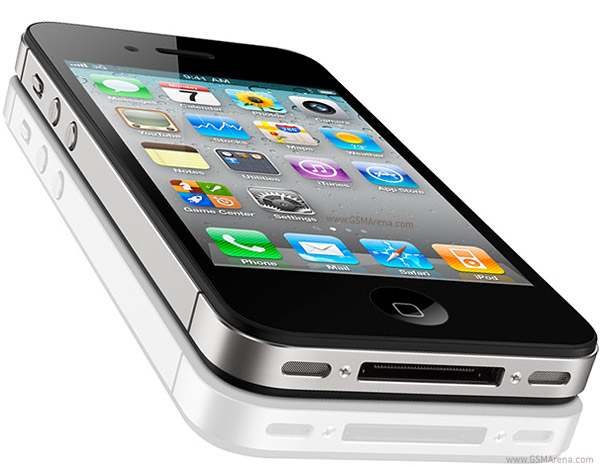
Apple launched the GSM version of iphone 4 last year, but as i feel this phone faced lots of problems and it was not popular as they expected. iphone 4 also had many technical issues. but the main reason for less popularity of iphone 4 is android phones. when comparing to android, iphone has lots of restrictions. so now it's becoming less popular. at the launch of iphone 4, apple never mentioned about a CDMA version of iphone 4 because they never expected that. but after releasing super phones like Galaxy S for GSM and and Droid X for CDMA, apple realized that they can't win the race. so they thought to get into the CDMA market to attract some customers. according to me, that's the story of iphone 4 CDMA. as i feel, the biggest mistake that apple done was they implemented many restrictions to iOS/iphone. at the time when iphone 3g released, there were lots of cheap mobile phone which had 5MP camera. but they included a 2Mp camera. also the restrictions of itunes is a really pain for many of users. another thing is apple always hates hackers. but google is not, they are hacker friendly. apple does everything to avoid jailbreaks and other hacking stuff. but google gives every help to hackers to develop a better os. because of that iphone is not the mobile phone king anymore. any way, about this CDMA iphone 4, nothing new. it has same features of att iphone 4. the CDMA version of iphone 4 comes with a Verizon contact. also rumors says that they will release the white iphone 4 as a CDMA version.
Today we’re launching a new version of Google Goggles that’s faster and smarter than ever before. The new Goggles 1.3 client for Android can scan barcodes almost instantly. All versions of Goggles can now recognize print ads in popular magazines and newspapers. Finally, Goggles has also learned a fun new trick for Sudoku fans.
Barcodes
When shopping offline, it’s helpful to be able to learn more about a product by scanning its barcode. With the new Android version of Google Goggles, scanning barcodes is much faster. Open Goggles and hover over the barcode or QR code. Within a second the phone gently vibrates and presents results, without requiring a button press. Simply tap on the result to read product reviews, check in-store availability and compare prices.
Print ads in magazines and newspapers
We’re excited to take another step in our vision of connecting offline media to online media. The next time you're flipping through the pages of your favorite magazine, try taking a picture of an ad with Goggles. Goggles will recognize print ad and return web search results about the product or brand. This new feature of Goggles is enabled for print ads appearing in major U.S. magazines and newspapers from August 2010 onwards.
This feature is different from the marketing experiment that we announced in November. We're now recognizing a much broader range of ads than we initially included in our marketing experiment. And when we recognize a print ad, we return web search results. While in the experiment, we return a specific link to an external website.
Sudoku
Our favorite weekend distraction is a quiet 15 minutes spent solving a Sudoku puzzle. But even that can be an frustrating experience if (like us) you make a mistake and are unable to solve the puzzle. Now, Goggles on Android and iPhone can recognize puzzles and provide answers to help make you faster than a Sudoku champ. So if you ever get stuck, take a clear picture of the entire puzzle with Goggles and we’ll tell you the correct solution. Check out this video to see how it works.
Google Goggles 1.3 with improved barcode scanning is available for download in Android Market. Recognition of print ads and Sudoku solver is now enabled for the Google Goggles app on Android, as well as the Goggles component of the Google Mobile App on iPhone.
Posted by Leon Palm and Jiayong Zhang, Software Engineers
As you know RIM official Facebook app doesn’t support Facebook chat, therefore here I would like to introduce an app that allow you to chat in Facebook while you on the go.
With JaredCo’s FaceChat you’re always hooked in and in touch with your facebook friends. Very important is totally……..Free !
Detail features: • Chat simply, easily, seamlessly on Facebook from your BlackBerry. Anyone can do it. • See who’s on line after logging on to your FB account. • See on-line friends’ Facebook avatars so you know who’s on the grid at a glance. • Carry on multiple chats simultaneously with a clean interface so you know who’s talking. • Once logged in faceChat will give you a vibrating notification letting you know one of your Facebook friends sent you a message.
*** IMPORTANT*** PLEASE READ CAREFULLY: You will need to have your Facebook Username to log in NOT your email address. If you don't have Username at your Facebook, please sign into Facebook on your computer go to account and choose help center! Then type in the searchfield 'username' then its the top answer that comes up! Follow the link and set your username! Sign out of facebook and sign back in! Now just open up FaceChat and use that username and your normal Facebook Password
Author: guide
| at : 7:45 AM |
Category : Android
|
The past few weeks have been exciting ones for the Android team: we recently released Nexus S and Android 2.3, Gingerbread, and we’ve even had some of our most popular team members take a trip to space. But we haven’t stopped buzzing with excitement: today at the Consumer Electronic Show (CES) in Las Vegas, we previewed Android 3.0, Honeycomb.
Honeycomb is the next version of the Android platform, designed from the ground up for devices with larger screen sizes, particularly tablets. We’ve spent a lot of time refining the user experience in Honeycomb, and we’ve developed a brand new, truly virtual and holographic user interface. Many of Android’s existing features will really shine on Honeycomb: refined multi-tasking, elegant notifications, access to over 100,000 apps on Android Market, home screen customization with a new 3D experience and redesigned widgets that are richer and more interactive. We’ve also made some powerful upgrades to the web browser, including tabbed browsing, form auto-fill, syncing with your Google Chrome bookmarks, and incognito mode for private browsing.
Honeycomb also features the latest Google Mobile innovations including Google Maps 5 with 3D interactions and offline reliability, access to over 3 million Google eBooks, and Google Talk, which now allows you to video and voice chat with any other Google Talk enabled device (PC, tablet, etc).
Please stay tuned for more Honeycomb news from the Android team. For now, you can get a taste of Honeycomb by checking out this video.
recently Acer launched couple of phones and it appears they were succeed. in 2010 December they released another mobile phone which runs Androis 2.2 OS. unlike their previous phone Liquid metal , this seems a mid range cheap phone. it has a 2.8 inch resistive touchscreen and the screen resolution of this phone is 240 x 320 pixels. since the touchscreen is resistive type, multi-touch is not available. also you might not be able to enjoy the all fancy features of android OS. Acer beTouch E140 has 512MB internal memory and supports up to 32GB memory cards. it has a 7.2 HSDPA modem and has both bluetooth and wifi. Acer beTouch E140 has 3.15Mp camera and it supports video recording. but there is no secondary camera in this phone. but this phone has good navigation features. it has a digital compass and a GPS receiver. it also comes with lots of pre installed android apps.







 As you know RIM official Facebook app doesn’t support Facebook chat, therefore here I would like to introduce an app that allow you to chat in Facebook while you on the go.


