Kingston Digital launched its fastest USB Flash drive, the Kingston DataTraveler Ultimate 3.0 Generation 2 (DTU30G2). Using a native USB 3.0 controller for better performance and power management, the DTU30G2 has a read speed up to 100MB/s, and a write speed up to 70 MB/s. When plugged into a USB 2.0 port, the drive has read and write speeds of around 30MB/s. The DTU30G2 is available in 16-, 32- and 64GB capacities.
Capacities: 16GB, 32GB, 64GB # Requirements: system with USB 3.0 port # Backwards compatible: with USB 2.0 # Speed: When plugged into a USB 3.0 system: up to 100MB/s read and 70MB/s write; when plugged into a USB 2.0 system: maximum specification performance (around 30MB/s read and write) # Dimensions: 2.90″ x 0.87″ x 0.63″ (73.70mm x 22.20mm x 16.10mm) # Operating Temperature: 32°F to 140°F (0°C to 60°C) # Storage Temperature: -4°F to 185°F (-20°C to 85°C) # Practical: durable casing with a solid lanyard loop # Warranty: 5 Years.
LG Electronics (LG) today unveiled the LG Optimus 2X, the world’s first smartphone with a dual-core processor. Along with more powerful multimedia features, the LG Optimus 2X’s high-performance Tegra 2 processor makes for faster, smoother web browsing and applications and lets users multitask with virtually no screen lag. “Dual-core technology is the next leap forward in mobile technology so this is no small achievement to be the first to offer a smartphone utilizing this technology,” said Dr. Jong-seok Park, CEO and President of LG Electronics Mobile Communications Company. “With unique features such as HDMI (High Definition Multimedia Interface) mirroring and exceptional graphics performance, the LG Optimus 2X is proof of LG’s commitment to high-end smartphones in 2011.” Developed by graphics processor powerhouse NVIDIA®, the dual-core Tegra 2 system-on-a-chip found in the LG Optimus 2X runs at a clock speed of 1GHz and boasts low power consumption and high performance for playing video and audio. Users will experience faster web browsing and smoother gameplay compared with single-core processors running at the same speed as well as instantaneous touch response and seamless multitasking between applications. The LG Optimus 2X offers 1080p HD video playback and recording with HDMI mirroring that expands content on external displays to full HD quality. The LG Optimus 2X can connect wirelessly to any DLNA (Digital Living Network Alliance) compatible digital device such as HD TVs for a console-like gaming experience taking full advantage of the phone’s HDMI mirroring, accelerometer and gyro sensor. Thesmartphone also includes both rear- and front-facing cameras, microSD memory expandability, Micro-USB port and a hefty 1500mAh battery. The LG Optimus 2X will be available in Korea next month with countries in Europe and Asia to follow. The phone will initially be released with Android 2.2 (Froyo) and will be upgradeable to Android 2.3 (Gingerbread). The upgrade schedule will be announced in local markets in due course.
Key specifications:
1Ghz dual-core processor (NVIDIA Tegra 2)
4-inch WVGA screen
8GB memory (up to 32GB via microSD)
1,500 mAh battery
8 megapixel rear camera and 1.3 megapixel front camera
InvoTek launched a new product using safe laser technology that enables a person with limited movement to write, communicate, and control their environment. Unveiled at the Abilities Expo 2011, the Safe Laser System projects a low-power light-beam onto a light-sensing customizable keyboard. The device can generate a synthetic voice or output keystrokes to a computer. Priced at $2,200, the Safe Laser System is available through the InvoTek website.
More info: Add this to your site to take advantage of the importance of social networking to increase your target audience. You will increase hits, sales, click-throughs, customer comments and create a more global community. You can also track Google Analytics click Events by entering your tracking code. Social networks supported: Blogger, Twitter, Facebook, Gmail, Orkut, Google Bookmarks, Google Buzz, MySpace, Digg, Reddit, Delicious, Stumble Upon, Windows Live, Aol Lifestream, Baidu, Yahoo! Buzz, Linked In, Friendster, Netvouz
In November 2010, we began displaying relevant emergency phone numbers at the top of the results page for searches around poison control, suicide and other common emergencies in 14 countries. Today, we are making it even easier for you to quickly reach the help you may need by adding click-to-call capabilities for all of these emergency information search results.
We piggybacked on the way that our mobile ads team enabled click-to-call phone numbers in local ads on mobile devices. This capability enables businesses to make it even easier for customers to reach them when those customers search on Internet-enabled mobile devices. The functionality seemed ideal for the emergency information feature.
Previously, mobile users in one of these countries who conducted searches around poison control, suicide and common emergency numbers received a result showing the relevant emergency phone number.
People on mobile will now get the same result, but the phone number will be a link that allows you to dial the number instantly, just by clicking the link.
Now, the poison control result in Spain is click-to-call on a mobile phone
We hope this addition is a small step that helps connect people with crucial information that they need immediately.
Instant Previews provides a fast and interactive way to evaluate search results. Starting today, Google Instant Previews is available on mobile for Android (2.2+) and iOS (4.0+) devices across 38 languages. Similar to the desktop version of Instant Previews, you can visually compare search results from webpage snapshots, making it easier to choose the right result faster, especially when you have an idea of the content you’d like to see.
For example, if you’re looking for a webpage that has both photos and descriptions, you can use Instant Previews to quickly identify these pages by navigating across the visual search results with a few swipes of your finger. Or perhaps you’re looking for an article, a step-by-step instructions list, or a product comparison chart—with Instant Previews, you can easily spot pages with the right content without having to navigate back and forth between websites and search results. And when the mobile version of a website is available, we’ll show you a preview of the mobile page.
To use Instant Previews on your mobile device, do a search on www.google.com and tap on the magnifying glass next to any search result. A side-by-side comparison view of the webpage previews for the first page of search results will appear. When you find a result you like, tap on the preview to go straight to the website. It’s as easy as finding a recipe for poaching an egg:
You can learn more about Instant Previews for mobile in our Help Center. We hope that you enjoy finding the right result faster with Instant Previews!
Posted by Brian Ngo, Software Engineer, Mobile Search team
Ever been stuck in traffic, only to find out you’d have been better off going a bit out of your way to take a less congested route? If you’re like me, you probably hear the traffic report telling you what you already know: traffic is bad on the road you’re currently on, and you should have taken another. It doesn’t need to be this way, and we want to help. So we’re happy to announce that Google Maps Navigation (Beta) will now automatically route you around traffic. With more than 35 million miles driven by Navigation users every day, this should add up to quite a bit of time saved!
On a recent trip to New York, I was running late to meet some friends at the Queens Museum of Art. I had no idea that there was a traffic jam along the route I would normally have taken. Thankfully, Navigation routed me around traffic. I didn’t even have to know that there was a traffic jam on I-495, and I got to enjoy a much faster trip on I-278 instead.
Navigation now uses real-time traffic conditions to automatically route you around traffic.
You don’t have to do anything to be routed around traffic; just start Navigation like you normally would, either from the Navigation app or from within Google Maps. Before today, Navigation would choose whichever route was fastest, without taking current traffic conditions into account. It would also generate additional alternate directions, such as the shortest route or one that uses highways instead of side roads. Starting today, our routing algorithms will also apply our knowledge of current and historical traffic to select the fastest route from those alternates. That means that Navigation will automatically guide you along the best route given the current traffic conditions.
Not only can you save time and fuel, you’re making traffic better for everyone else by avoiding traffic jams. Keep in mind that we can’t guarantee that Navigation will be able to find a faster way, but it will always try to get you where you’re going as fast as possible.
You can begin routing around traffic with Google Maps Navigation for Android in North America and Europe where both Navigation and real-time traffic data are available.
Enjoy your newly found free time!
Posted by Roy Williams, Software Engineer, Google Maps Team
On Tuesday evening, the Android team was made aware of a number of malicious applications published to Android Market. Within minutes of becoming aware, we identified and removed the malicious applications. The applications took advantage of known vulnerabilities which don’t affect Android versions 2.2.2 or higher. For affected devices, we believe that the only information the attacker(s) were able to gather was device-specific (IMEI/IMSI, unique codes which are used to identify mobile devices, and the version of Android running on your device). But given the nature of the exploits, the attacker(s) could access other data, which is why we’ve taken a number of steps to protect those who downloaded a malicious application:
We removed the malicious applications from Android Market, suspended the associated developer accounts, and contacted law enforcement about the attack.
We are remotely removing the malicious applications from affected devices. This remote application removal feature is one of many security controls the Android team can use to help protect users from malicious applications.
We are pushing an Android Market security update to all affected devices that undoes the exploits to prevent the attacker(s) from accessing any more information from affected devices. If your device has been affected, you will receive an email from android-market-support@google.com over the next 72 hours. You will also receive a notification on your device that “Android Market Security Tool March 2011” has been installed. You may also receive notification(s) on your device that an application has been removed. You are not required to take any action from there; the update will automatically undo the exploit. Within 24 hours of the exploit being undone, you will receive a second email.
We are adding a number of measures to help prevent additional malicious applications using similar exploits from being distributed through Android Market and are working with our partners to provide the fix for the underlying security issues.
For more details, please visit the Android Market Help Center. We always encourage you to check the list of permissions when installing an application from Android Market. Security is a priority for the Android team, and we’re committed to building new safeguards to help prevent these kinds of attacks from happening in the future.
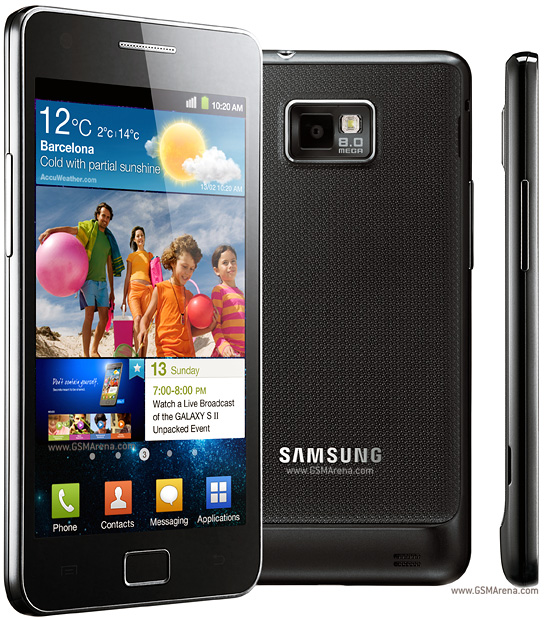
as you know Samsung galaxy is the most famous samsung mobile phone series and it's a one of the most famous Android phone. samsung keeps continuing this series. they recently announced about the newest member of Galaxy. it's Samsung Galaxy S 2 which is an extended version of galaxy S. the new Galaxy S 2 has a 4.3 inch large super AMOLED display. the outer shape is almost similar to the Galaxy S but this time it comes with a Gyro sensor. also the Galaxy S 2 will have the TouchWiz 4.0 UI. the internal memory of this phone is 16 or 32GB and it supports up to 32GB memory cards. it has a 8MP camera with a LED flash. the camera supports 1080p video recording. also Galaxy S 2 comes with Android 2.3 OS. it powered by a Dual-core 1GHz ARM Cortex-A9 proccessor and has a Mali-400MP GPU. Samsung galaxy S 2 integrated with google's NFC feature. it also has a FM radio, GPS and a digital compass.
Don't worry, winter's almost over! Spring, also known as the vernal equinox, officially starts on March 22, 2011 at 7:21 pm EDT for those of us in the Northern Hemisphere.
Whether it’s Google Places with Hotpot or Google Latitude, we’re working on helping you connect the people you care about with places you love. Now, when you’re rating your dinner spot using Google Maps for Android, you can share your review with even more people by posting it to Twitter.
Post your ratings and reviews to Twitter When you rate and review places like restaurants or cafes from Google Places, you can share valuable recommendations with your Hotpot friends and across Google’s products – in search results, on google.com/hotpot, and on Place pages. But we wanted you to be able to share your recommendations even more broadly. So today, you can start sharing your ratings and reviews with your followers on Twitter directly from your Android-powered device.
When rating on the go using our rating widget, just choose to Post review to Twitter and connect your Twitter account. You’ll get a preview of your tweet and will be able to post your ratings and reviews moving forward.
Post your ratings and reviews to your Twitter followers.
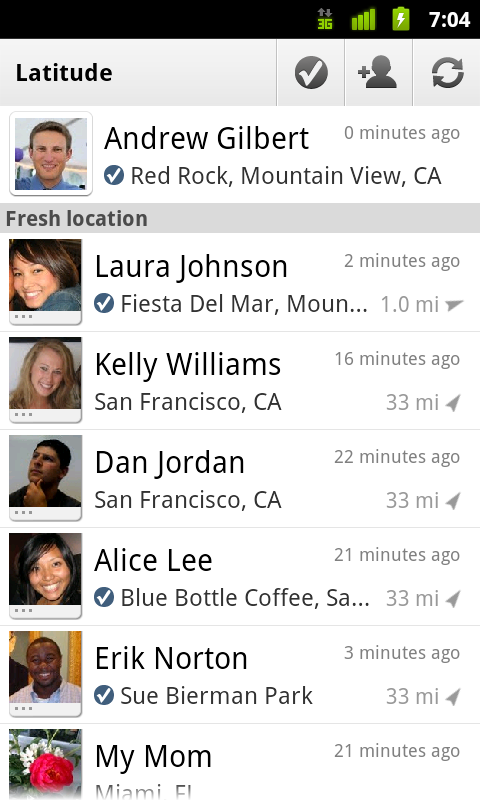
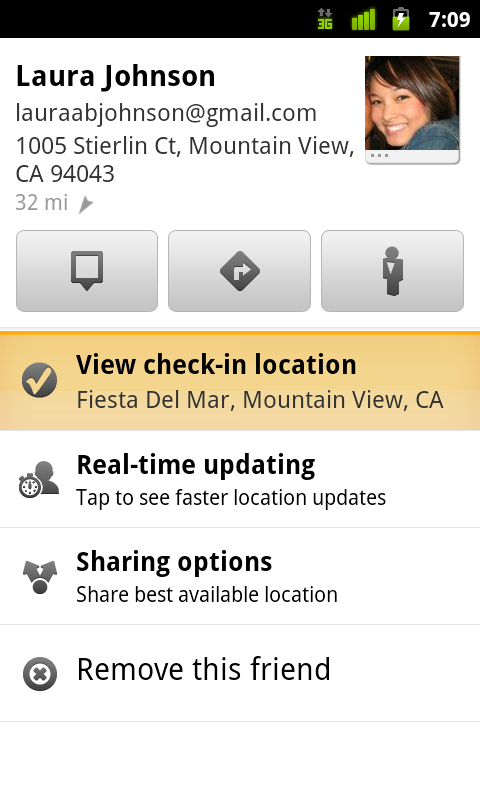
Check-ins: ping friends and search for places Starting last month, you could share information about the place you were at, in addition to your location, by checking in at places using Google Latitude. Starting today, if you see nearby Latitude friends on the map and want to ask them where they are, you can quickly “ping” them instead of having to text or call. They’ll receive an Android notification from you asking them to check in at a place. And when they check in using your request, you’ll get a notification right back so you know which place to go to meet up with them.
From a friend’s Latitude profile, ping them (left) and they’ll receive a notification (right).
You’ll also be able to more easily check yourself in at the right place. Sometimes there are a lot of nearby places around you, and the right one is missing from the suggested list of places to check in. You can now quickly search for the right place using the Search more places button.
Search for the right place to check in if it’s not among the suggested places.
To start posting Hotpot ratings to Twitter and pinging Latitude friends, just download Google Maps 5.2 from Android Market here (on Android OS 1.6+ devices) everywhere it’s already available. Please keep in mind that both Latitude friends need version 5.2 in order to use the new “ping” feature. Learn more in the Help Center.
Posted by Adam Connors, Google Maps for mobile team
More info: A facebook profile picture rating widget that randomly displays profile pictures two at a time and you can pick which one is better. The votes are stored in a central database and you can see where you and your friends pictures rank. There is a search function built into the widget. You must allow Facebook access to register your and your friends profile picture.
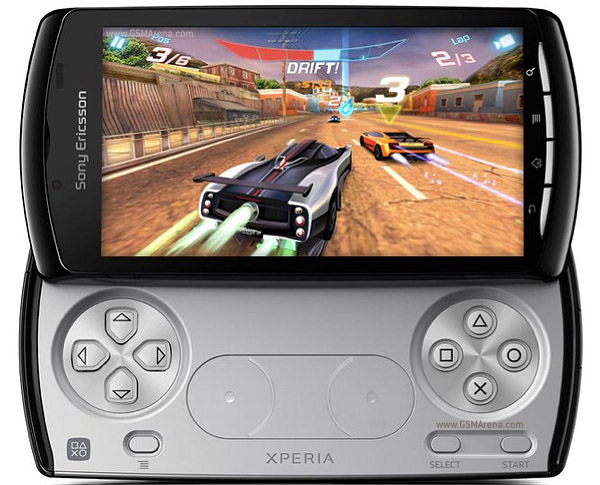
even now there are lots of PSP fans around the world. most of the people like it because it's portable. but what happen if a PSP integrated to your mobile phone?. now it's becoming a real thing because of the Sony Ericsson XPERIA PLAY mobile phone. it almost looks like a PSP and specially designed for gamers. but the difference is it runs with Android 2.3 OS. XPERIA PLAY has a 4 inch large LCD touchscreen and it's back light is LED. to give you a better stereo sound, Sony Ericsson XPERIA PLAY has a dual speakers. and it has touch sensitive gaming controls. another thing is this phone comes with the latest version of Timespace UI. since XPERIA PLAY is a gaming device, it has very powerful hardware. the processor is 1GHz and it has a Adreno 205 GPU to generate high quality graphics. this phone has a 5Mp camera and it supports 720p video recording. also there is a secondary camera which allows you to get video calls over 3G. like many Android 2.3 phones, XPERIA PLAY integrated with google's SNS technology. and it comes with all new google applications.
To begin editing, visit docs.google.com in your mobile browser, and select a document to edit. Switch from view to edit mode by pressing ‘Edit’ to turn on the mobile editor and start typing away. As a reminder, mobile editing is available on Android (2.2+) and iOS (version 3.0+) devices. You can learn more about Google Docs for mobile on www.google.com/mobile. As always, feedback in the comments and on the forums is appreciated.
Yesterday morning, a tasty treat arrived on our campus. And what better way to welcome Honeycomb to the Android family than with redecorating the lawn of Building 44 a bit?
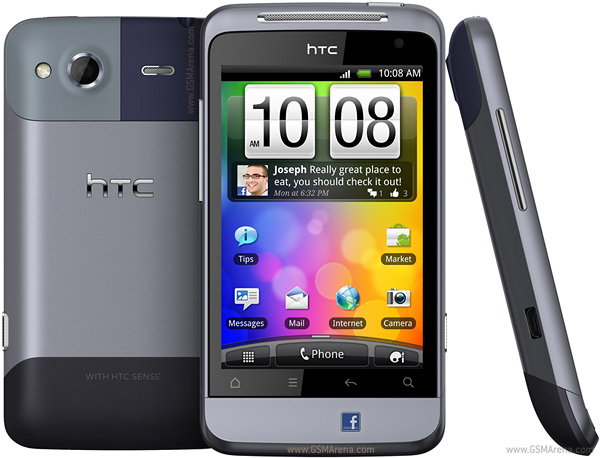
last week HTC announced another new phone, HTC Salsa. it's a candy bar type Android phone and has HTC native look. but this phone has couple of specifications. first thing is it has a dedicated key for facebook. also according to it's features, this phone might be bit cheaper than Desire S and similar phones. HTC Salsa has a 3.4 inch capacitive touchscreen and has very nice design. it available in two colors, silver and white. HTC Salsa runs with Android 2.3 Gingerbird OS. it also comes with the latest version of HTC sense UI. HTC Salsa has 600MHz processor and a 512MB RAM. the internal memory is 512MB and it supports up to 32GB memory cards. the main camera of this phone is 512MB and it supports geo tagging and face detection features. also the camera comes with a LED flash. HTC Salsa also has a secondary camera at the front. it supports 3G video calling. this phone comes with the latest version of bluetooth. it also has wi-fi and a 7.2MBP/s HSDPA modem. since this phone has Android 2.3, it has Google's SNS technology.
Over the past few months, we have launched several new mobile search features for iPhone and Android-powered devices that make it easier to find local businesses. In the US, we launched an “open now” feature which lets you filter local search results to show only businesses that are open right now, based on their listed hours. When you’re hankering for pizza at 1 o’clock in the morning, this can be really handy:
Other local search options available globally include filtering by star ratings (find a highly-rated restaurant for your first date) and by distance (especially handy when you’re on foot).
You may have noticed other improvements as well, like the addition of images, reviews from around the web and bigger buttons for viewing a map or calling a business directly. Each business’s open hours are also shown in the result snippets.
If you haven’t used local search recently, now is a great time to try it out. Just go to www.google.com in your browser, tap on the “Places” link at the top of the page, and do a search. You can also access these features when searching for businesses on Google Maps for mobile on Android devices.
Posted by Yoshi Matsumoto and Keiji Maekawa, Software Engineers
Earlier this month, we announced the first version of the Blogger app for Android on the Blogger Buzz blog. Today, we’d like to share some tips on how you can use the Blogger app to quickly publish posts when you’re on the go.
1. Attach photos as you compose
Take photos using your phone’s camera and instantly add them to your post while you draft. You can also insert photos from your phone’s gallery, all within the Blogger app.
2. Include your current location With your phone’s GPS, you can let your readers know where you’re blogging from by selecting your current location, no additional typing needed.
3. Share to Blogger Share videos, products, photos, links and other interesting things you would like to include in your blog via the share button that’s available in many apps, including Google Maps for mobile, YouTube, and your web browser. After you share an item to your Blogger, it will be inserted into new post that’s automatically created for you so that start can composing right away.
4. Switch across multiple Blogger accounts If you’re an author of more than one blog, you can easily switch between your different accounts by tapping on the orange arrow next to the title of your blog. That way, you can publish articles for each of your blogs to keep your all of your readers up to date.
5. Keep track of published posts and saved drafts See what you’ve composed in an easy to read list by tapping the list icon located on the top right-hand corner.
We hope that you enjoyed these blogging tips. If you haven’t done so already, you can download the free Blogger app for Android 2.1+ devices from Android Market or scan the QR code below. As always, we would love to hear what you think so please feel free to share your thoughts with us through our feedback form.
Today we’re excited to announce some updates to the official Google Reader app for Android. Over the last couple of months, we’ve added some of your most-requested features:
Unread count widget - choose any feed, label, person, or “all items” and get the unread count on your home screen. Clicking on the widget takes you to straight to that stream.
News ticker widget - if you prefer a bit more information, you can add a larger size widget that cycles through items on any stream you want in Reader. Clicking any headline will take you to the article, while clicking the folder will take you to that stream.
Mark previous as read - if you’ve used the mobile version of Reader before and missed this feature, it’s now back! As you scroll down your reading list, hit “Mark previous as read” at any time to only mark things above the screen as read.
In addition to these new features, we now have an official Russian translation as well.
We hope you enjoy the update - give it a try! You can download the app in all countries from Android Market. The Google Reader app is available for devices running Android 1.6 or higher, with widget functionality available for devices on Android 2.2+.
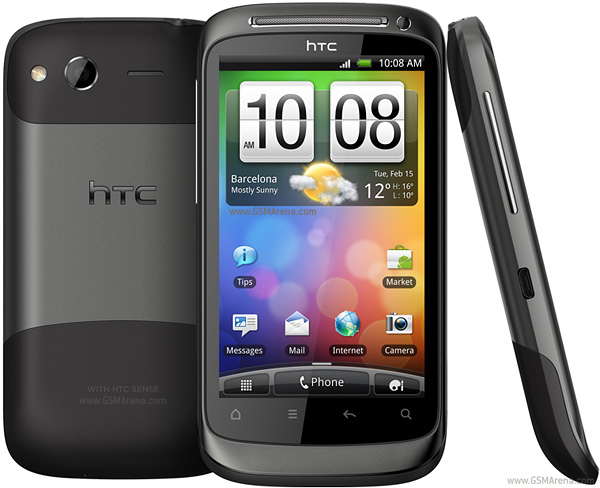
HTC Desire S is the next phone of HTC desire phone series. last week they announced couple of phone models and most of them will be available in next few months. the very special thing of this phone is it comes with Google Android 2.3 gingerbird OS. Desire S is in the first set of HTC phones which runs 2.3 gingerbird. also HTC Desire S has a S-LCD display. tech guys say it's better than AMOLED but consumes more power. the design is almost similar to the previous desire phone but in this time there are touch keys at the bottom. like previous models HTC Desire S has a 3.7 inch capacitive touch screen and the resolution is 480 x 800 pixels. this phone runs with a 1 GHz Scorpion processor and 768MB RAM. it has a 1.1GB internal memory and supports up to 32GB memory cards. HTC Desire S camera is almost similar to the previous one. it's 5MP and supports 30fps HD video recording. this phone has a 14.1MBP/s HSDPA modem , bluetooth and wi-fi. it comes with google's SNS feature and lots of google apps. also Desire S comes with a new media player which is better than the standard android player.
Back in August 2008, we launched a Google Translate HTML5 web app for iPhone users. Today, the official Google Translate for iPhone app is available for download from the App Store. The new app has all of the features of the web app, plus some significant new additions designed to improve your overall translation experience.
Speak to translate The new app accepts voice input for 15 languages, and—just like the web app—you can translate a word or phrase into one of more than 50 languages. For voice input, just press the microphone icon next to the text box and say what you want to translate.
Full-screen mode Another feature that might come in handy is the ability to easily enlarge the translated text to full-screen size. This way, it’s much easier to read the text on the screen, or show the translation to the person you are communicating with. Just tap on the zoom icon to quickly zoom in.
And the app also includes all of the major features of the web app, including the ability to view dictionary results for single words, access your starred translations and translation history even when offline, and support romanized text like Pinyin and Romaji.
Looking to reach out to your customers on mobile? Join us for our live streamed discussion on February 10th, 1:05pm EST with Mary Meeker, Partner at Kleiner Perkins, Google’s Dennis Woodside, SVP of Americas Operations, and Jason Spero, Head of Americas Mobile Advertising on the future of mobile and mobile marketing. To learn more about the event and live stream, please visit the Google Mobile Ads blog.
Posted by Suzanne Mumford, Google Mobile Ads Marketing Team
If you’ve ever cursed a phone’s tiny screen as utterly inadequate for sifting through an overflowing inbox you’ll be pleased to hear that the Gmail mobile web app now supports Priority Inbox. Priority Inbox helps combat information overload by automatically identifying your important messages so you can focus on those first. Until today it was only available on the desktop and on Android devices.
Now, once you set up Priority Inbox in the desktop version of Gmail, you’ll see Priority Inbox sections when you visit gmail.com from your phone’s browser and click on the ‘Menu’ screen. You’ll also see importance markers in your inbox, so you can quickly identify which messages are important.
This feature is available for most mobile browsers that support HTML5, such as devices running Android 1.5+ and iOS 3+. Currently, you can’t set up Priority Inbox or mark messages as important or unimportant from here. If you have suggestions or want to learn more, visit our Help Center and forum.
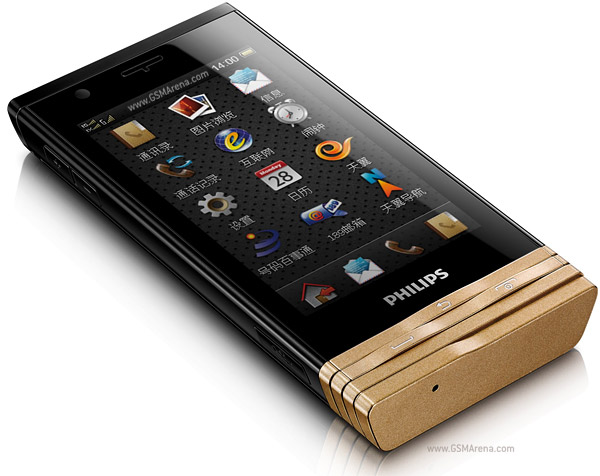
as you know now Philips playing a good role in mobile phone industry. they recently announced another newest phone, Philips D812. if you need a cool touch screen phone but if you don't have lot's of money to spend, Philips D812 might be your best choice. this phone has very smart design. the controls keys at the bottom are really awesome. seems like a part of the phone's body. Philips D812 has a 3.2 inch resistive touchscreen. it has an accelerometer sensor to rotate screen orientation. this phone has handwriting recognition feature which allows you to type text messages easily. the internal memory of this phone is 130Mb and it supports up to 8GB memory cards. also Philips D812 comes with 2GB memory card included. another very special thing of Philips D812 is it supports both CDMA and GSM. but video calling only works with CDMA. Philips D812 has a 3.15MP camera and a VGA front camera. the camera supports Geo tagging feature. Philips D812 has a good GPS receiver and the maps application is google maps. it has wi-fi and bluetooth but HSDPA is not available.
Over the past two years, developers around the world have helped make Android Market the go-to place for more than 100,000 apps, games and widgets. Previously, you could only access Android Market directly from your device, but today, we are introducing the Android Market website that lets you browse and search for great apps right from your web browser.
The website makes it easy to discover great new apps with a bigger, brighter interface. You can also send apps directly to your Android device with just a few clicks—no wires needed. We’ve built in new social features, too. You can share apps with your friends through Twitter. And you can read and post app reviews directly to Android Market from the web or from your device.
And what about all those apps you’ve already purchased and downloaded? Sign in to the website with your Google account and click “My Market Account” to see all the apps you’ve purchased or downloaded. It makes managing all your apps quite easy.
The Android Market website was officially unveiled today during an event at Google headquarters where we showcased Honeycomb (Android 3.0), our latest Android release built from the ground up for tablets. Honeycomb has a completely redesigned user interface, with more interactive notifications and widgets, improved multi-tasking, and the latest and greatest Google Mobile services optimized for tablets. We also showed off pre-release applications optimized for Honeycomb, from over 17 developers including:
AccuWeather
CNN
Disney Mobile
The Economist
Fuze box
Glu Mobile
Google Body
Grocery iQ
Intuit
Ngmoco
Pulse News
Quickoffice
Time Magazine
TouchType
Trendy Entertainment
War Drum Studios
Weatherbug
Zynga
Stay tuned for more at Mobile World Congress (February 14) in Barcelona where you'll see more than 50 developers demoing their latest phone and tablet apps at the Android booth in Hall 8.
Posted by Eric Chu, Mobile Platforms Program Manager
Update (5:20PM): Full video from the event earlier is now available. Check it out!
As we announced last November, millions of people have downloaded Google Shopper for Android to help them shop on the go. Today, we’re excited to let you know that Google Shopper, our popular Android shopping application, is now available for iPhone as a download in the App Store. Google Shopper turns your iPhone into a shopping assistant, so you can:
Learn more about products and read relevant user reviews
Compare prices at online and local stores
Save and share products for later consideration
Let’s say you’re planning a special meal for Valentine’s Day - but you need a cast-iron skillet to get the recipe just right. With Shopper, finding one is easy enough: just type in “cast iron skillet” or say it using Voice Search. Then, from the results, you can choose a specific product that appeals to you. Alternatively, if you were in the store and wanted to see product reviews, you could also scan the barcode of a particular product.
Once you’ve selected a product result, you can compare prices across web retailers, and even find where you can purchase the item nearby, which is especially useful for those of us who are last-minute shoppers. For some retailers, we also provide inventory information so you can see if a particular store branch has the item in stock, has limited availability, or if the item is out of stock and you should head to a different store.
If you’re not sure about making a purchase or are building out a gift list, you can “star” products for future consideration. You can also share items with friends across your social network to let them know about products you love or great deals you've found.
You can download Google Shopper for free in the App Store. Shopper is available for iPhone 3GS and iPhone 4 with iOS 4.0+ in English only for the United States and the UK.
We hope you enjoy shopping with Google Shopper!
Posted by Richard Hung, Senior Product Manager, Google Shopper
We first introduced Google Latitude to help you stay in touch with your friends and family by making it easy to share where you are. For the 10 million people actively using Latitude each month, this “where” has been a location on a map. Starting today in Google Maps 5.1 for Android, you can also connect that location to a real place by checking in there using Latitude.
Connecting your location with places You can still use Latitude to automatically update and share your location, but check-ins let you add context to the location—like captions to a photo. For example, I live in San Francisco but often travel around the world. Until today, sharing my location let friends and family know if I was across the globe or in their neighborhood. Now, check-ins let them see the cool restaurant I’m trying in Taipei or join me for a latte at the cafe nearby.
See where your friends are on a map and where they’re checking in.
Not your typical check-ins Because you can use Latitude to automatically detect your location, we’ve added a few twists to checking in to make it really easy:
Notifications: Turn on check-in notifications in Latitude’s settings and get a notification to check in at a nearby place once you arrive. Never forget to check in again.
Automatic check-ins: Choose to automatically check in at specific places you designate, and you’ll be checked in when you’re there. You can talk to friends or finish your bagel without fumbling with your phone.
Check out: Once you leave, Latitude knows to automatically check you out of places so friends aren’t left guessing if you’re still there.
Explore your world one check-in at a time Latitude is built right into Google Maps for Android so check-ins work across Latitude and Maps seamlessly. For example, check in at that new hamburger joint, and you’ll see its Place page with reviews to help you order. When friends check in at a place, you can go straight from their Latitude profile to its Place page to learn about it, fire up Google Maps Navigation (Beta) for turn-by-turn directions to them, and more.
You can also check in at a favorite place to earn special status there; you’ll see if you’ve become a “Regular,” a “VIP” or a “Guru” on its Place page. Keep checking in to hold onto your status or reach the next level.
Latitude check-ins are built right into Google Maps and Place pages.
Of course, we thought carefully about how to make checking in to places quick and easy while giving you control over your privacy. Just like when sharing your location with Latitude, checking in is 100% opt-in, and you can choose to share any check-in with your friends on Latitude, publicly on the web and your Google profile, or just yourself. Learn more about checking in and managing your check-ins with Latitude in the Help Center. Coming later this week, you’ll also be able to see your complete history of check-ins using the optional History tab at google.com/latitude from your computer.
Update (2/11/2011): You can now see check-ins and your own check-in history at google.com/latitude from your computer.
Choose options for individual check-ins or turn on and off notifications in the Latitude settings.
Start checking in by downloading the latest Google Maps from Android Market (on Android 1.6+; tap here if you're on your phone) and then joining Latitude from the main menu. You can check in everywhere Maps and Latitude are already available. If you’re using the new Latitude app for iPhone, you’ll see your friends’ check-ins, and we’ll update the app soon so you can check in too.
Just the beginning... Checking in from Latitude is just one step in helping you connect the places you go with the people you care about. We believe in letting you use or share your location however you like, and we’re working on making location and check-ins useful in more places—across Google and the web.
Posted by Joe LaPenna, Software Engineer, Google Latitude Team
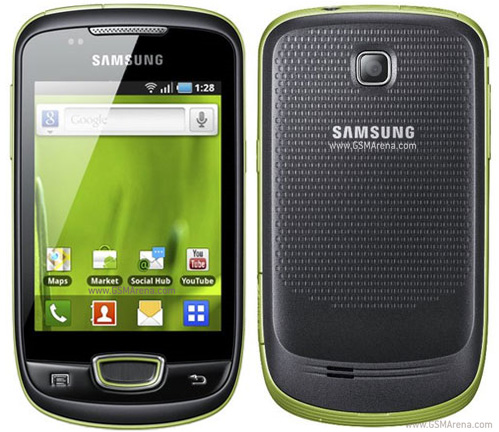
When a phone model becomes very popular, many mobile companies launches a mini version of the same phone to open it's market more wisely. the mini version has reduced features and less price, but easy to market. Nokia and Sony ericsson did this to their N97 and XPERIA phones. right now, Samsung Galaxy is the most famous mobile phone series. they recently announced a mini version of Galaxy. it's cheap and has a 3.14 inch capacitive touchscreen. but Galaxy Mini S5570 runs with Android 2.2 froyo version and it has a 600MHz processor. this phone comes with Samsung's TouchWiz v3.0 UI. Samsung has their own sound technology called DNSe and they included it to Galaxy Mini S5570. it has a 7.2MPp/s HSDPA modem, bluetooth and wi-fi. the internal memory of this phone is 160MB but it supports up to 32GB memory cards. Galaxy Mini S5570 has a GPS receiver, a Digital compass and a FM radio. the main camera of this phone is 3.15MP and it supports geo-tagging. also like all other Galaxy phones,Galaxy Mini S5570 comes with all Google applications.
We see a lot of you have shown interest in the colorful LG Optimus Me P350 phones! Take a look as these two friends have so much fun with LG Optimus Me P350, they don't even realize the sun becoming the moon! From excellent browser performance and seamless connectivity with Android™ 2,2 (Froyo). intuitive pinch zoom, easy web browsing with Voice Search™ to the five vibrant colors to choose from and affordability -- no wonder their exploration went for hours!
Introducing MOTOROLA ATRIX. Is this your next smartphone? Laptop? Desktop? Entertainment Centre? Or all the above? The world's most powerful smartphone is the future of mobile computing.
In this video we discuss how Android 3.0 Honeycomb might work on a smartphone. We know for a fact that Google plans to release Android Honeycomb for smartphones in 2011. It will allow for buttonless hardware, better multiasking, better management of the homescreens, and much more. Honeycomb will first show up on the Motorola Xoom tablet.
Ultimate Portable Entertainment System Makes Its Debut This Year, Further Expanding the PlayStation® Business in the Portable Gaming Market
Tokyo – Sony Computer Entertainment Inc. (SCE) announced its next generation portable entertainment system (codename: NGP), which delivers the ultimate portable entertainment experience. NGP will make its debut at the end of the year 2011.
NGP is designed to offer unparalleled interactive entertainment that is only possible on PlayStation®. This new system offers a revolutionary combination of rich gaming and social connectivity within a real world context, made possible by leveraging SCE's experience from both PSP® (PlayStation®Portable) and PlayStation®3 (PS3®) entertainment systems.
Deep and immersive gaming is at the core of PlayStation's DNA, and NGP is the latest embodiment of this vision. By having both Wi-Fi and 3G network connectivity, together with various applications, NGP will enable infinite possibilities for users to "encounter," "connect," "discover," "share" and "play" with friends wherever they are. Within the device are a range of features that provide a genuinely cutting-edge, next generation ultimate portable entertainment experience. ・Stunning OLED and Revolutionary User Interface
NGP incorporates a beautiful multi-touch 5-inch organic light emitting display (OLED) as the front display. A high-performance CPU / GPU combined with OLED enables rich, visually striking graphics never seen before on a portable entertainment system, for both games and other digital entertainment content. The new system also incorporates a unique multi-touch pad on the rear, and together with the front touch display, NGP offers new game play allowing users to interact directly with games in three dimension-like motion, through "touch, grab, trace, push and pull" moves of the fingers. ・Super Oval Design and Dual Analog Sticks
While succeeding the basic design philosophy of PSP, NGP adopts the Super Oval Design form factor, created to fit comfortably in users' hands. For the first time, a portable entertainment system will feature two analog sticks, which enable a wider range of game genres to be brought into the portable experience. ・LiveArea™
Every game title for NGP will be provided with a space called "LiveArea™" where users can share the fun and excitement with other players. Users will have access to the latest information of games provided from SCE and 3rd party developers and publishers through PlayStation®Network. Additionally, NGP users will be able to view an "Activity" log that is constantly updated with accomplishments from users who are playing the same game, which in turn can trigger active real-time communication among users. ・Near
SCE will also provide location-based services on NGP as part of the basic features utilizing PlayStation Network. The new application called "Near," developed specifically for this service and the network, will be pre-installed in the system to let users find out what their friends in the vicinity are playing now or what they were playing recently. Users can meet their friends and new players virtually, regardless of what games they are playing, simply by sharing their game information across different dimensions of time and distance. ・New Game Medium
NGP adopts a new game medium, a small flash memory based card, dedicated for NGP software titles. Taking advantage of the flash memory feature, this innovative card can store the full software titles plus add-on game content or the game save data directly on to the card. By adopting flash memory based card, SCE will be able to provide game cards with higher capacity in the future, allowing developers to store more game data to deliver rich and immersive games.
NGP will also come equipped with two cameras on its front and rear, as well as three motion sensors, gyroscope, accelerometer and electronic compass, all of which are designed to enable users to enjoy the world of entertainment that is linked with real life experiences.
PlayStation®Suite (PS Suite), announced today, will also closely coordinate with NGP. The newly developed and released game content for Android™ based portable devices can also be enjoyed on NGP. As a result, users will have access to not only the most leading-edge content, but also some of the more casual experiences that typify the mobile market place.
SCE will vigorously promote NGP towards the launch as the next generation portable entertainment platform and deploy various measures to further expand the portable gaming market.
Simultaneously Launching "PlayStation®Certified" License Program to Provide PlayStation® Content and Development Support for Android™ Based Portable Devices.
Tokyo - Sony Computer Entertainment Inc. (SCE) unveiled "PlayStation®Suite" (PS Suite), delivering the PlayStation® experience to Android™ based portable devices*1. Through this entirely new initiative, users will be able to enjoy PlayStation content on an open operating system for the first time in PlayStation history.
In the dramatically evolving and diversifying mobile market, the number of users who enjoy games casually on a variety of devices including mobile phones, smart-phones and tablet PCs, has been increasing significantly. By offering "PlayStation quality" content to this rapidly growing market, SCE will not only deliver the PlayStation experience to a wider base of users around the globe, but will also be able to offer game developers and publishers the potential to further expand their business opportunities to these devices.
In providing the PlayStation experience on Android based portable devices, SCE will commence a "PlayStation®Certified" license program for hardware manufacturers. Through this program, SCE will offer necessary support, including development support as well as logo licensing, to ensure the delivery of PlayStation quality experience across various devices.
On the software front, SCE plans to provide PS Suite content within this calendar year, starting with original PlayStation games*2 (PS one® classics) that will allow users to enjoy "PlayStation quality" gameplay on their Android based portable devices. SCE also plans to open PlayStation®Store where users will be able to download content in an easy to use environment, directly via the Android based portable devices. Moreover, SCE will provide a new game development environment in an effort to ensure new and compelling content is delivered on PS Suite, which will also offer opportunities for a wider base of developers and publishers to further expand their business on various portable devices.
Newly developed content for PS Suite can also be enjoyed on the next generation portable entertainment system (codename: NGP), which SCE announced today. Users who have never experienced PlayStation content can get a taste of the PlayStation experience through PS Suite and from there, they can enjoy the ultimate portable entertainment experience that is only possible on NGP.
SCE will vigorously enhance the entertainment world delivering the PlayStation experience to a wider base of users.
*1 Android™ 2.3 or beyond is required.
*2 PS one game console software title. We will announce the tiles when ready.
GLOBAL – Being disorganised is SO last year. This year is about getting things in order and being as efficient as possible. For us anyway. That’s why we’ve put together a little guide to how you can make this year a productive one, right from your own mobile phone. Find out how you can get organised with your Nokia, right here. Read on.
We’re hoping last year was a great year for you and we’re here to help you make this year an even better one. With some useful advice and tips on how to make the most of your phones native software, plus some help from the apps that await your attention from Ovi Store.
1. Ovi Setting up an Ovi account is the best way to get the most of your Nokia phone. Once you’re set up with your free account at Ovi.com, you’re phone is only a few clicks away from any service Nokia have to offer.
2. Email Pre-installed on all Nokia devices, it goes under the name of Nokia Messaging and it’s the first thing we do when setting up a new phone. With support for Ovi Mail, Yahoo! Mail, Google Mail, Windows Live Hotmail and many other POP/IMAP accounts, as well as corporate accounts using Microsoft Exchange, you’ve got access to ten personal email accounts. Instantly connecting your phone to any/all of your inboxes.
3. Ovi Store For those apps that aren’t already installed on your phone, it’s the best and quickest way to get apps. Shopping at Ovi Store is as simple as clicking the icon and browsing through through thousands of apps and games.
4. Sticky Notes Touch No organised person would be complete without Stickynotes. You write little things down and stick them on your wall to remind you to-do something later. Sticky Notes Touch lets you jot down tasks quickly, onto a virtual cork noticeboard.
5. Ovi Maps Ditch the A-Z or the other route planners you browse on the net before you leave the house. Switch on Ovi Maps on your phone and you’ve got instant navigation – with turn-by-turn directions – to anywhere in the world. For free, forever.
6. Multiple alarms If you wake up at 5am every morning, bringing yourself to reset that alarm every night is the last thing you want to do. Set up a repeating alarm so that you only need to set it once, leaving the phone to do the boring repetitive bit by itself. Navigate to the Alarm section of your phone, add your new alarm time and choose which days you want the alarm to sound. Job done.
7. Ovi Contacts Personal data is the number one thing people care about most when something goes wrong with their technology. A phone can be replaced, but the phone numbers held within can be lost forever. Ovi Contacts can grab all the phone contacts from your phone and store them online, forever. Syncing your phone over-the-air with the server from time to time will keep this list up-to-date and keep your contacts safe and sound.
8. Social Being organised doesn’t just mean being on top of things at work, your social life also needs organising too. You don’t want to forget someones birthday do you? Social keeps you up-to-date with your friends’ activity – through their status updates or tweets – and lets you download events they’ve organised on Facebook right into your phone calendar and comes built-in with new Symbian devices.
9. Quickoffice Pro 6 Do some of your work on the hour-long train journey home, so you can spend some more time playing with the kids or shooting zombies in that new game you’ve got. Whatever you prefer. Quickoffice Pro 6 turns your phone into a portable work desk, enabling you to go through those accounts and finish that presentation for the next morning.
10. Memory Status Touch After a while and a good few months down-the-line, you might notice you’ve filled all that storage space on your phone with apps, games, music, videos and photos. Memory Status Touch, helps you keep an eye on the memory of your phone so you know when it’s time to do some house-keeping, to remove some of that old content.
MUMBAI, India – Nokia has been voted the most trusted brand in India according to a survey conducted and published by research firm Trust Research Advisory (TRA). The “Brand Trust Report, India Study 2011″ was launched in Mumbai on Tuesday by Dr A P J Abdul Kalam, Former President of India. The survey covered 16,000 brands, based on 61 questions to 2310 respondents in nine major cities.
The number two and three spots were taken by Tata and Sony, respectively, while LG and Samsung were positioned at number four and five.
Describing the methodology of the survey, TRA’s CEO N Chandramouli said, “As trust is a veiy subjective term, we developed a trust matrix which included 61 components defining trust which include empathy, non-threatening ambience, perceived competence, corporate altruism, commanding respect, shared interest, displaying sincerity, enthusiasm, outward appearance and accepting responsibility.”
Other interesting results from the survey were that Pepsi came in at number 36, while Coca-Cola was at 60th place.
The survey also ranked personalities, with cricketer Sachin Tendulkar coming in at 59, ahead of Father of the Nation, Mahatma Gandhi, (ranked 232nd) and Bollywood actor Aamir Khan (242nd).
GLOBAL – It’s that time of the year again when we at Nokia Conversations want to remind you all that the so-called Nokia Lottery is a dishonest scam. We’ve warned against this for the past two years but still we hear news – through our comments – that the scammers are still trying get you to part with your hard-earned cash. Don’t let them get it. It’s yours; keep it. Join us as we give you some tips on how to stay safe this year.
Back in 2009 we let you know that the Nokia Lottery doesn’t exist and never will. Then in early 2010 we did the same thing again, as it’s clearly needed. Racking up more than 700 comments combined, you’ve copied and pasted the scamming emails you’ve received in your droves. This is a great way of helping fellow readers determine what’s real and what’s not. But it always ends the same way: the Nokia Lottery isn’t real. How the Nokia Lottery scam works
There are a couple of methods these scammers use, in the hope of stealing your money.
You receive an email claiming you have been chosen at random, to receive a prize, usually a large figure of money. In this case, £350,000 is the prize. However, to receive your winnings you must send them some money as an admin charge. £650 in this same case. They hope you’ll be so dazzled by the large sum of money they claim you’ve won, that you’ll send the admin fee. It’s at this point you’ll never hear from them again and your money will be lost.
A second method commonly used is contacting you by SMS. These text messages will tell you you’ve won a heap of money, like in this case, but you must first phone a telephone number or email back to hand over your bank details. Do not do this. Never give your bank details to a stranger, especially if all you know about them is their mobile phone number.
Whatever method they use, they will be asking for the same thing. Either your bank account details, or some money in another form and the messages they send always look official, but they’re not. They’re fake. What to do if you receive a Nokia Lottery scam SMS or email
Don’t respond to the messages, doing so will only encourage them to keep contacting you.
There are several agencies and sites out there to help you, where you can report the fraud in the hope to get these stopped:
Action Fraud Snopes The Anti-Phishing Working Group
If you haven’t entered any competition, or if the prize looks too good to be true, then it almost certainly will be. Let’s have a safe 2011.
GLOBAL – Email delivery to your mobile phone is becoming very popular. Emailing from your phone has plenty of benefits, but what do you do with those emails that are 20MB in size, with some high-res images or 30 page PDFs? Mobile Documents by VISIARC, offers email retrieval, via The Cloud. Read on to find out more.
Emailing on-the-move, via a phone, is a great way of keeping in contact with anybody in the world. Especially if you’re waiting for that important email from work telling you you’ve won that new contract, or something. However – up until now – opening large emails on your Nokia phone has not only been time-consuming, but also costly. Downloading a file of 65 MB, just to find out that the information inside isn’t really relevant, can end up costing you lots of money. So you could log onto a PC and download the files that way, but that’s not always possible when you’re on a train, plain or anywhere else. Mobile Documents opens up your email as a normal email client would, but within the email it’ll show you the attachments all laid out with details of how large the file is, how many pages, the type of document and a thumbnail of the document itself. Setting up Mobile Documents
First on the agenda is to download the app. This app’s currently in Beta phase, which means it’s still in development but is nearly ready. Beta apps give you the opportunity to play with an app before it goes live, so some changes will be made when it finally graduates. Download from Nokia Beta Labs, or the Ovi Store. We noticed that you have to install the app to the C drive, as installing to E meant the homescreen widget didn’t find Mobile Documents. Install complete, you’ve got the freedom to browse the demo on your phone. We’d recommend you try the demo first as it’s a good way of knowing what the app is all about without setting up your email addresses, that comes later.
Happy with your tutorial and want to continue setting up your email accounts? Go back to the main screen and enter your email address to sign up for the full version, which is still free. During setup, you’ll need to assign your email account with a pin number, for added security, which we think is a good idea. Homescreen widget setup
Find an empty slot on one of your homescreens and long-press on the screen. Select the plus symbol, scroll to mail and your mailbox will ask you to select which email account you wish to use. Now you’ll notice you have the Mobile Documents logo next to your email address, selecting this will mean all your mail will now run through the Mobile Documents client. Viewing attachments
If you receive a large email with attachments, open it up and scroll to the bottom to find the attachments. Pressing on one of these attachments will bring up a menu with the options; View, Read, Copy and Download.
View, opens a preview of the document with the ability to flick through the pages from left to right. This is great for selecting what you actually want to view from the document without having to download it first.
Read, transcribes the document for you and gives it to you in the simplest form. If you’ve got a PDF or Word document, Read will give you the text version.
Copy, allows you to copy that file to your clipboard and Download, does what you’d expect. It saves it to to your phone for later use, if you so need it.
One of the great features of Mobile Documents is that you can send any of the attachments you’ve already received, onto somebody else without having to download the file. Because all this data is never actually downloaded in the first place, you’re simply passing the information from the server to the other recipient, this is called Cherry Picking. Cherry Picking
Open Mobile Documents, select the email account you wish to send an email from if you have more than one, and compose new mail. Start with adding the contact who will receive the email. Next, press the screen below the subject line. This is the box you’ll need to type your message in. Once you’ve typed your message, press Add Att. at the bottom of the screen and it’s here that you can browse any other email – from any email account you’ve set up- and add an attachment straight into your message – without ever downloading it onto your device. Pressing send will send the email instantly, from The Cloud. Document Support
You’ll be able to retrieve most documents that get sent to your inbox, as there is currently support for a variety of Word documents and image files; .jpg .png .pdf .doc .ppt
Currently Mobile Document is available for the Nokia N8. Download it from Ovi Store, or Nokia Beta Labs However, remember as it’s a Beta app, it may be a little rusty around the edges.